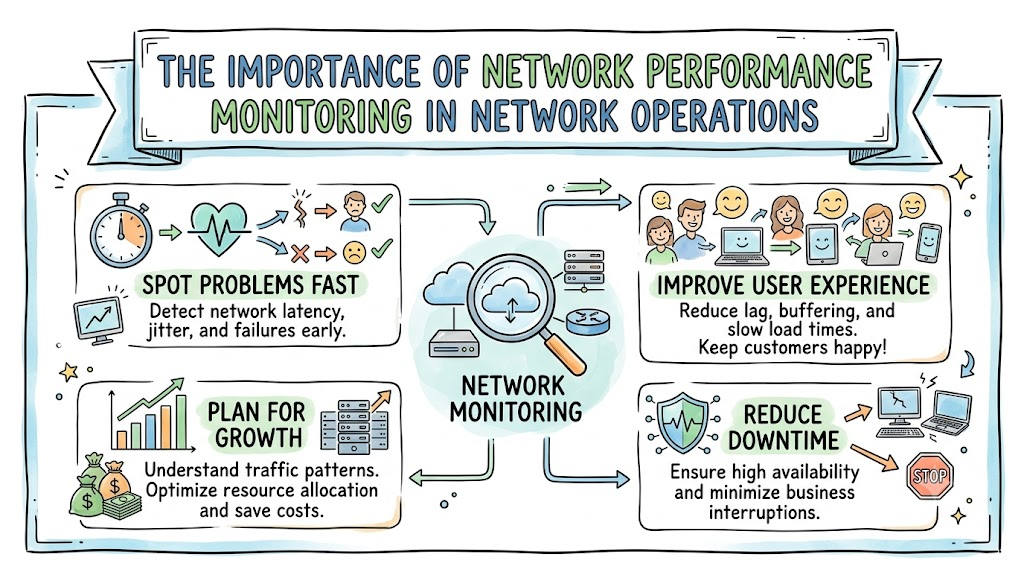
In this guide, we explore why network performance monitoring is essential for modern network operations. Learn how teams track data flow, prevent downtime, improve security, and build fast, reliable systems with structured operational workflows.
Imagine a huge city where millions of cars drive on the roads every second. If traffic lights stop working or a bridge gets blocked, the whole city freezes.
A computer network works in the very same way. Digital letters, videos, and game data travel across wires and radio waves all day long.
Network operations teams act like city traffic police. They make sure data keeps moving and never gets stuck in big jams.
To do this job well, these teams use special tools called Network Performance Monitoring (often shortened to NPM). These tools check the health of the entire system day and night.
When teams monitor their systems, they spot problems before users even notice them. They keep applications fast, stable, and ready for work.
What Is Network Performance Monitoring?
Network performance monitoring is the steady process of watching, measuring, and testing network traffic. It checks how well data moves from one device to another.
Think of it like a doctor giving a patient a regular checkup. The doctor checks the heartbeat, body temperature, and blood pressure.
In a network, the monitoring system tracks data speed, waiting times, and device health. It shows operators whether the system is healthy or needs quick medicine.
Without these tools, network engineers are essentially blind. They would have to wait for users to call and complain about broken services.
Why Modern Networks Need Constant Care
Today, businesses depend on fast networks to sell goods, hold video calls, and save files. When a network goes down, work stops completely.
Also, modern systems are far larger than old office setups. They connect physical computers, remote home laptops, and distant cloud servers.
Because data travels through so many hops, things can break in many places. A bad wire or a crowded router can slow down everything.
Monitoring tools keep eyes on all these moving parts at once. They bring all the status clues onto a single screen so teams can act fast.
The Four Vital Signals of Network Health
To know if a network feels well, engineers watch four main vital signs. Each sign tells a different part of the story.
- Latency: This is the travel time. It measures how long a packet takes to reach its goal and come back.
- Bandwidth: This is the size of the road. It shows how much data can fit on the wire at one time.
- Throughput: This is the real speed. It measures the actual data that safely reaches the other end each second.
- Packet Loss: This happens when wires drop data boxes along the way.
When these four signs stay in a healthy range, apps load smoothly. But if packet loss jumps, screens freeze up.
Key Operational Concepts You Must Know
Network operations teams rely on clear metrics to judge daily health. If you want to run great systems, you must know what these words mean.
First is uptime. Uptime measures the percentage of time that a service stays online and ready for users.
Second is MTTR, which stands for Mean Time to Repair. It tells you how many minutes it takes to fix a problem once it starts.
Monitoring systems give alerts that slash your MTTR. They point straight to the broken part so you do not waste time guessing.
| Operational Term | What It Means | Why It Matters |
|---|---|---|
| Uptime | Time the network stays awake | Keeps business open for customers |
| MTTR | Time taken to fix an issue | Shorter times mean less money lost |
| Baseline | Normal daily traffic level | Helps you spot weird spikes quickly |
| Jitter | Bumpy delays between packets | Smooth flow stops voices from sounding robotic |
Setting a baseline is another crucial concept. A baseline records what typical traffic looks like during an ordinary day.
When you know what “normal” looks like, odd changes stand out immediately. An unexpected spike in the middle of the night can signal an issue right away.
Proactive Care Beats Reactive Fixing
In the past, many companies used a reactive model. They only worked on network boxes when something made an angry noise or broke down.
That old approach costs companies huge amounts of lost money and lost time. Reactive teams constantly rush to put out fires.
Modern teams practice proactive care instead. They watch slow trends over weeks and months.
If a hard drive slowly fills up, the tool sounds an alarm weeks ahead of time. The team fixes the problem before it can ever cause a crash.
Finding Root Causes with Telemetry
When an app turns slow, the storage team often blames the network team. Then, the network team blames the software writers.
This blame game happens when nobody has hard facts. Good monitoring data ends this argument right away.
Telemetry tools collect hard logs, device metrics, and traffic flows from every box. Engineers look at these traces to see the exact truth.
The data might show that an outside internet provider dropped connections. With facts in hand, teams solve problems together without finger-pointing.
Platform Implementation vs. Culture — What’s the Real Difference?
Buying an expensive monitoring platform does not fix your network by itself. You also need the right team habits and mindset.
The platform is the software package you set up. It gathers numbers, draws pretty charts, and sends phone alerts.
The culture is how your human team behaves every day. A healthy team respects alerts, tests changes safely, and reviews mistakes openly.
If your culture is poor, engineers will ignore noisy alert emails. The platform can scream about a fire, but nobody will look at the screen.
How Teams Divide Responsibilities
- Network Operations Center (NOC) Engineers
- Platform: Set alert rules, clean dashboards, and build live maps.
- Culture: Respond to red flags quickly and update incident logs clearly.
- System Architects
- Platform: Select monitoring tools that scale across multiple clouds.
- Culture: Design spare paths so single broken links never bring down apps.
- Engineering Leaders
- Platform: Provide money for proper monitoring servers and software licenses.
- Culture: Reward teams that prevent outages instead of only praising hero fixes.
Alert Fatigue and How to Stop It
Alert fatigue is a real danger in modern network rooms. It happens when a tool sends hundreds of useless warnings every single day.
When humans see too many minor alarms, their brains tune them out. Later, when a real disaster strikes, the critical alert gets lost in the pile.
Smart operations teams tune their monitoring tools with care. They make sure only urgent, actionable problems send high-priority alarms to pagers.
Minor notifications go to daily summary boards instead. This simple habit keeps engineers sharp, calm, and ready to act.
Real-World Use Cases of Modern Operations
Let us see how monitoring changes real work across diverse industries.
First, consider online retail stores during busy holiday sales. Millions of shoppers click “buy” within the same hour.
Monitoring systems track database links and payment pathways in real time. If an order pipe begins to jam, automated scripts spin up extra servers.
The shopping site stays snappy, customers finish their checkouts, and the company protects its sales.
[User Clicks Buy] ───> [Load Balancer] ───> [App Server] ───> [Payment Gateway]
                             │                     │                  │
                             ▼                     ▼                  ▼
                     [Continuous Network Monitoring & Live Baselines]
Next, think about modern hospitals. Digital patient charts, heart rate monitors, and MRI machines all link to the local network.
If a network switch fails, doctors cannot pull up lab records during emergencies. Monitoring tools alert engineers the second a cable drops.
Backup links take over immediately, keeping patient data flowing without interruption.
Finally, consider financial trading institutions. In trading, a delay of five milliseconds can cost huge sums of money.
Network teams use specialized probes to watch packet movement down to the microsecond. They route traffic through the fastest fiber lines to maintain a competitive edge.
Catching Hidden Cyber Threats
Network monitoring also plays a giant role in modern cybersecurity. Bad actors often sneak into networks quietly to steal private files.
They try to hide from basic antivirus tools on user laptops. But they cannot hide their data traffic as it moves over the wire.
Monitoring systems flag unusual data transfers, such as big files leaving the company at 3:00 AM.
Security teams catch the intrusion right away and shut down the account. This quick action protects private records from leaking to the public.
Smart Capacity Planning
Networks are not static; they grow bigger every single year. Companies hire more staff, install new apps, and send larger files.
If you do not plan ahead, your wires will run out of space without warning. Then, all your apps will crawl to a halt.
Monitoring software keeps records of traffic growth over months. It draws trend lines that show when links will hit maximum capacity.
Operations teams use these charts to order faster fiber lines months before lines get crowded. This keeps growth smooth and painless.
Common Mistakes in Operations Engineering
Even skilled teams can make serious errors when setting up network monitoring. Learning about these traps helps you avoid them.
The first big mistake is only monitoring internal servers. Many teams forget to monitor the outside internet service providers and DNS systems.
If your internet provider drops packets, your customers still see a broken site. You must monitor the entire path from user to server.
Another common error is ignoring network device logs. Router logs often show warnings about dying power supplies or hot fans days before a crash.
Good Approach: [User Path] + [External DNS] + [Internal Routers] + [Server Logs]
Bad Approach:  [Internal Routers Only] ───> Blind to real user problems!
A third mistake is collecting too much data without any clear goal. Storing billions of useless metrics fills up storage drives and slows down search tools.
Instead, focus on the metrics that actually impact users and service health. Keep your dashboards focused, clean, and fast to read.
Finally, teams often forget to test their alerts. If you do not test your alert paths, you may discover a broken notification system during a real disaster.
How to Become an Operations Expert — Career Roadmap
Working in network operations is an exciting and rewarding career path. The world will always need skilled people who can keep the internet running fast.
If you want to become an expert, you need a clear learning plan. You should build your skills step by step over time.
Start by understanding how computers talk to each other. Learn about IP addresses, subnetting, and how routers move packets.
Next, install free monitoring tools in a home lab. Run packet capture tools like Wireshark to see live traffic moving across your home router.
| Career Stage | Core Learning Focus | Practical Milestone |
|---|---|---|
| Beginner | Basic protocols (TCP/IP, DNS, DHCP) | Capture and read home packets in Wireshark |
| Intermediate | SNMP, NetFlow, and Linux metrics | Build a working dashboard for your home devices |
| Advanced | Automation scripts and API monitoring | Write Python scripts to fix link errors automatically |
After you master the basics, learn how to write simple automation scripts. Python can help you pull data from hundreds of switches in seconds.
You will soon know how to spot errors, read graphs, and fix complex systems like a true pro.
The Power of Automation in Network Operations
As networks grow, humans cannot configure thousands of devices by hand every day. This is where automated monitoring steps in.
When a monitoring tool detects that a link has failed, it can trigger an automated script. The script reroutes traffic to a healthy path in a few seconds.
This automation keeps services running while the engineer investigates the root cause. It turns potential multi-hour outages into minor blips.
Learning to pair monitoring metrics with automated response scripts makes an operations engineer truly valuable.
Improving User Experience and Service Level Agreements
Every business wants its customers to enjoy using its digital products. Slow connections drive users away to competing platforms.
Companies write contracts called Service Level Agreements (SLAs). These promises guarantee that their services will work reliably.
If a company breaks its SLA promise, it often pays big cash penalties to its clients.
Monitoring tools provide exact uptime and performance reports. These reports prove that the company met its promises and delivered quality service.
FAQ Section
- What is the primary difference between network monitoring and network management?Network monitoring watches the health and flow of your traffic.Network management involves actively changing settings, updating device software, and configuring hardware.
- Can network monitoring tools detect hardware failures before they happen?Yes, they track temperature, fan speeds, and rising packet error rates over time.When these numbers slowly climb, engineers can swap out the failing hardware before it crashes.
- What is the difference between active and passive monitoring?Active monitoring sends simulated test packets across the network to measure current speed.Passive monitoring silently reads and inspects the real user data already traveling on the wires.
- Why is establishing a network baseline so important?A baseline tells you what your network looks like on a normal Tuesday afternoon.Without a baseline, you cannot tell if a sudden burst of traffic is normal or an attack.
- How does monitoring help reduce business operational costs?It stops expensive outages and cuts down the time engineers spend guessing issues.It also prevents companies from buying unnecessary bandwidth upgrades they do not need.
Final Summary
Network performance monitoring is the steady heartbeat of modern IT operations. It turns dark, confusing data highways into clear, visible maps.
By tracking latency, bandwidth, and packet health, teams discover issues before users ever notice them. This keeps applications responsive and digital stores open for business.
Success requires combining powerful monitoring tools with a supportive team culture. Teams must avoid noisy alerts, watch end-to-end paths, and plan for future growth.
When you make monitoring a top priority, you build a resilient, fast, and future-proof digital network.