Have you ever wondered why a website takes time to load? Data travels across wires to reach your screen.
Sometimes, that trip takes longer than it should. We call this trip time network latency, which simply means delay.
Another key part of internet speed is bandwidth use. Bandwidth is the size of your data pipe. You can learn how to test these systems at Noopsschool today.
What Is Network Delay?
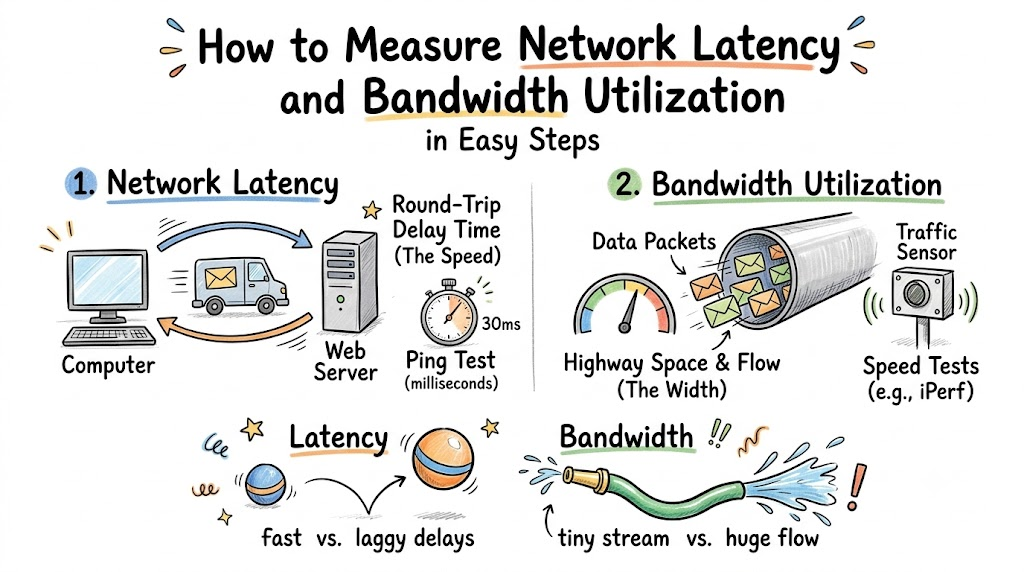
Think of your internet connection like a highway. Your computer sends small packets of data like tiny mail trucks.
These trucks drive to a server far away. Next, the server sends new trucks back to you.
The time it takes for that round trip is latency. When latency is high, your screen freezes. Low latency keeps your games and calls running fast.
What Is Bandwidth Use?
Now, picture how wide that highway is. That width is your bandwidth.
A wider highway fits more data trucks side by side. Bandwidth use shows how full that highway is right now.
If too many people watch videos, the road fills up. So, cars must slow down and wait.
How to Test Network Delay
You can test network delay with a simple tool called ping. Ping sends a tiny test packet to a server.
Then, it counts the milliseconds until the packet returns. A smaller number means a faster link.
Another great tool is traceroute. Traceroute shows every stop your data makes along the road. It helps you spot the exact hop that causes delays.
How to Test Bandwidth Use
You can check bandwidth use with active speed tests. A tool called iPerf sends test files between two computers.
It tells you the exact speed your link can handle. You can also look at your home router dashboard.
The dashboard shows live graphs of current data flow. It reveals which phone or computer uses the most data.
Key Operational Concepts You Must Know
Network pros track a few core numbers to keep systems healthy. Knowing these terms helps you find network bugs quickly.
First is throughput. Throughput is the real amount of data that arrives safely each second.
Second is jitter. Jitter means the delay changes from one second to the next. High jitter makes voice calls break up.
| Term | What It Means | Simple Example |
|---|---|---|
| Latency | Round-trip delay time | Time for a ball to bounce back |
| Bandwidth | Total pipe space | Width of a water hose |
| Throughput | Real data delivered | Buckets of water filled per minute |
| Jitter | Uneven arrival times | A faucet that drips irregularly |
Packet Loss Explained
Sometimes, routers get too full. When this happens, they drop data boxes on the floor.
We call this problem packet loss. When packets vanish, your computer must ask for them again.
This extra step wastes precious seconds. You can spot packet loss easily by running a long ping test.
Platform Implementation vs. Culture — What’s the Real Difference?
Fixing network speed takes two things: good tools and good habits. Tools make up the platform. Daily habits make up the culture.
You can buy the fastest routers in the world. But you will still have problems if your team ignores high traffic.
A good team tests speed before they launch new apps. They also share speed reports every single week.
How Different Roles Track Speed
- Network Admins
- Platform: Set up automated ping sensors across office links.
- Culture: Check alerts every morning before meetings start.
- Software Builders
- Platform: Use code tools that track data load sizes.
- Culture: Shrink file sizes to save bandwidth for users.
- IT Managers
- Platform: Buy clear dashboard screens for the server room.
- Culture: Train staff to fix lag issues quickly.
Real-World Use Cases of Modern Operations
Let us see how people measure network speed in real life.
First, look at hospital networks. Doctors send huge body scan files between buildings.
Admins track bandwidth use during busy morning hours. If the pipes fill up, they give scan files top priority.
Second, look at school computer labs. Hundreds of students open test pages at the exact same minute.
Teachers test latency before big exams begin. They make sure test clicks register right away without any spinning wheels.
Third, look at video game studios. Game makers test packet round-trips across different cities every day.
They set up servers near players to cut down travel time. This step stops lag before players notice it.
Common Mistakes in Operations Engineering
Many teams make mistakes when they measure network speed.
One big mistake is testing only during quiet night hours. Night traffic is always light.
You must test during busy hours to see real problems. Peak hours show how the network handles heavy crowds.
Another mistake is confusing bandwidth with raw speed. A giant pipe does not make single packets move faster.
Distance still causes delay because light takes time to travel. So, buying wider pipes will not fix long distance lag.
Finally, some people test speed over weak Wi-Fi signals. Walls and interference can ruin your test numbers.
Always plug in a network cable before you run serious tests. A direct wire gives you clean, honest test results.
How to Become an Operations Expert — Career Roadmap
You can turn network testing into an exciting job! Here is an easy path to follow step by step:
- Learn the Basics
- Practice running ping and traceroute on your home laptop.
- Read about how routers pass data packets back and forth.
- Practice With Real Tools
- Download free tools like Wireshark and iPerf to your computer.
- Measure how much data your family uses while streaming movies.
- Master Network Automation
- Write small computer scripts to run speed tests automatically.
- Send test results into a daily chart.
| Level | Goal | Main Tool |
|---|---|---|
| Beginner | Check ping and find basic lag | Ping tool |
| Intermediate | Measure link capacity and traffic flows | iPerf |
| Advanced | Set up real-time network alert boards | Prometheus |
Keep practicing on your home router. You will learn how to spot bottlenecks and fix them with ease.
FAQ Section
- What is a normal latency score for home internet?A score under thirty milliseconds is great for gaming and calls.Anything over one hundred milliseconds feels slow and choppy.
- Why does my bandwidth test show lower numbers than my plan?Internet plans show the top possible speed in perfect settings.Real traffic, weak Wi-Fi, and old routers lower your actual throughput.
- Does ping measure both upload and download speed?No, ping only measures the round-trip time in milliseconds.You must use a throughput test to measure data upload and download rates.
- What is the simplest way to test my network right now?Open your computer terminal and type ping followed by a website address.The screen will print your exact round-trip delay in milliseconds.
- Why does video streaming eat so much bandwidth?Video files contain millions of color dots for every second of film.Sending all those dots quickly fills up even wide data pipes.
Final Summary
Measuring network latency and bandwidth use is simple when you break it down. Latency tells you how long data takes to travel back and forth. Bandwidth shows how much data can fit inside your connection at once.
By using tools like ping and iPerf, you can find bottlenecks fast. Remember to test during busy hours so you see real-world performance. Once you know these numbers, you can speed up your network and keep delays away.