Have you ever tapped a link and waited forever for it to load? That waiting time happens when networks slow down.
Computer systems send files back and forth all day. When data gets stuck, work stops and people get upset.
You can learn how to build fast, reliable systems at Noopsschool. We will show you how smart monitoring keeps data moving without delay.
What Does End-to-End Monitoring Mean?
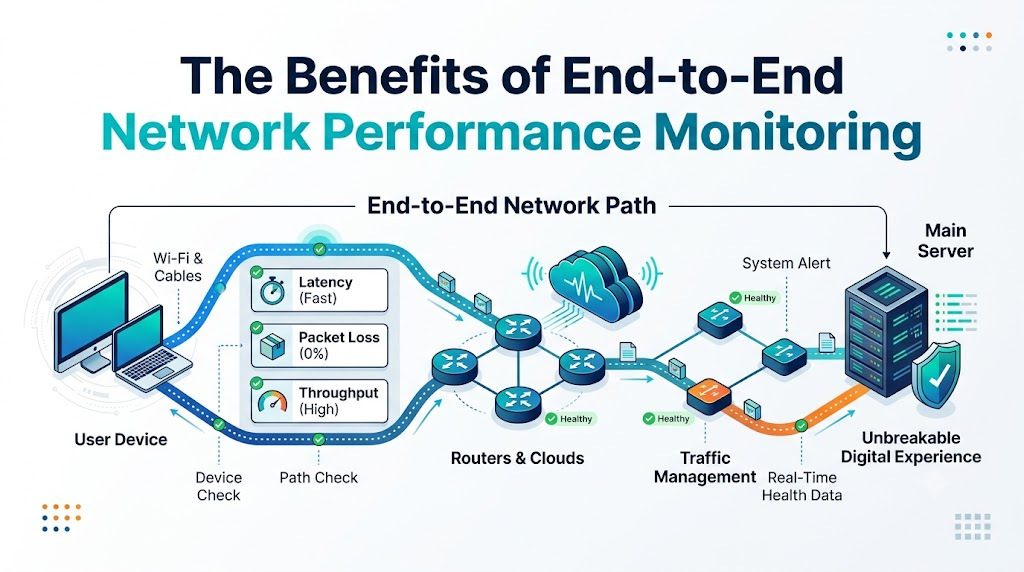
Think of a network like a long train track. Your laptop sits at one end of the line. The main computer, called a server, sits at the other end.
End-to-end monitoring checks every single foot of that track. It looks at your device, the cables, and the routers.
If any part slows down, the tool spots it fast. That way, teams fix problems before the whole train stops.
Why Watching the Whole Path Matters
Old tools only looked at one computer in the office. But today, data travels through many different clouds and cables.
Because data travels so far, trouble can hide anywhere. A single bad cable can slow down hundreds of people.
End-to-end tools watch the whole trip in real time. So, network teams always see the true health of the system.
Key Operational Concepts You Must Know
To keep systems healthy, you must track three simple network metrics. These numbers tell you if data moves fast or slow.
The first metric is latency, which means travel time. Latency measures how many milliseconds data takes to complete a round trip.
The second metric is packet loss. When wires drop small chunks of data, computers must send them again.
The third metric is throughput, which is total volume. It shows how much real data gets through each second.
| Metric | Simple Meaning | What Happens When Bad |
|---|---|---|
| Latency | Wait time | Apps feel laggy and frozen |
| Packet Loss | Dropped data boxes | Videos stutter and pause |
| Throughput | Flow amount | Big file downloads take hours |
Spotting Traffic Jams Early
Networks get crowded just like city streets during rush hour. When too many people watch video, routers get tired.
Smart monitors track this traffic before routers crash. They send a warning when memory fills up.
Next, the team can open new routes for that traffic. This action keeps everything running smoothly for every user.
Platform Implementation vs. Culture — What’s the Real Difference?
Good monitoring needs great tools. But it also needs a team that cares about speed every day.
The tool side is the platform. This means software agents, dashboards, and automated alert systems. These tools collect data every second.
The human side is the culture. Culture means how people use that data to fix daily issues.
How Teams Use Monitoring Together
- Network Helpers
- Platform: Use live maps to find broken wires fast.
- Culture: Check alerts early so users never notice problems.
- App Builders
- Platform: Watch server response times on clear dashboards.
- Culture: Fix slow database queries right away.
- Support Guides
- Platform: Read status pages to track customer issues.
- Culture: Give honest, clear updates to people who need help.
Real-World Use Cases of Modern Operations
Let us see how monitoring helps people in everyday life.
First, think about busy hospitals. Doctors share patient charts across digital tablets. Monitors ensure these records open without a second of lag.
Next, look at online shopping stores. During big holiday sales, millions of shoppers buy gifts at the same time.
End-to-end tools spot server strain instantly. Because the team sees the strain, they add extra cloud power right away.
Also, think about online learning schools. Teachers stream live lessons to kids at home. Monitoring tools protect video streams from dropping frames.
Common Mistakes in Operations Engineering
Many teams make easy mistakes when they set up new monitoring tools.
First, they turn on too many loud alarms. When phones beep every two minutes, workers stop reading the alerts.
Smart engineers set alarms only for real emergencies. That way, team members jump to work when real trouble starts.
Another mistake is ignoring the user point of view. A server might show green lights while users still see broken pages.
Always test connections from outside your office walls. This step shows you what real customers truly experience.
How to Become an Operations Expert — Career Roadmap
You can grow your skills and become a network operations expert!
Start by learning how data moves through cables. You can set up small routers at home to see how they work.
Next, learn how to read network reports. You can practice by pinging test servers to measure speed delays.
| Level | Key Focus | What You Learn to Do |
|---|---|---|
| Beginner | Basic Cables & Wi-Fi | Measure ping times and packet drops |
| Intermediate | Dashboard Tools | Set up alerts and read traffic charts |
| Master | Cloud Networks | Keep massive global systems running safe |
Soon, you can manage cloud software for big global companies. It is an exciting job that keeps the internet alive!
FAQ Section
- What is end-to-end network performance monitoring?It is a tool that watches your full data trip.It checks everything from your screen to the distant cloud server.
- Why does my company need this tool?It catches broken connections before customers call you.This saves money and keeps apps running fast.
- Does monitoring slow down the network?No, modern monitoring uses tiny test packets.It gathers performance facts without eating up your bandwidth.
- Can it help stop cyber attacks?Yes, strange traffic spikes often signal hackers trying to break in.The tool flags weird patterns so security teams act quickly.
- Is it hard to install?Most modern tools install in just a few clicks.You can connect cloud dashboards without buying heavy hardware.
Final Summary
End-to-end network performance monitoring keeps our digital world running smooth and fast. It checks every step of the data path so problems never hide. Teams that use these tools spend less time guessing and more time building.
When you track latency, loss, and traffic together, your systems stay strong. You protect user trust and save money along the way. Start watching your network path today to build an unbreakable digital experience!