Introduction
Network security has become one of the most important responsibilities in modern IT environments. Organizations manage thousands of devices, applications, cloud services, and user connections every day. As networks grow larger and more complex, manual security processes become difficult to maintain. Security teams often struggle to detect threats quickly, apply policies consistently, and respond to incidents without delays. This challenge has created a strong demand for network security automation.
Network security automation refers to the use of software, workflows, and intelligent systems to perform security-related tasks automatically. Instead of relying entirely on human intervention, organizations automate activities such as threat detection, firewall management, vulnerability assessment, incident response, compliance monitoring, and network configuration verification. As a result, teams can improve efficiency, reduce errors, and strengthen overall security posture.
Professionals who want to learn modern network security practices often explore training and operational frameworks offered by Noopsschool. A structured learning approach helps engineers understand how automation transforms traditional security operations and enables organizations to respond faster to emerging threats.
Modern enterprises no longer view automation as an optional enhancement. Instead, they consider it a core requirement for maintaining secure, scalable, and resilient network environments. Consequently, understanding network security automation has become a valuable skill for engineers, architects, administrators, and security analysts.
Understanding Network Security Automation
Network security automation is the process of using predefined workflows, scripts, policies, and orchestration tools to perform security tasks without requiring continuous manual execution. Security teams create rules and procedures that allow systems to react automatically when specific events occur. For example, a suspicious IP address can be blocked immediately after detection, reducing the risk of a successful attack.
Traditionally, security analysts spent significant time reviewing logs, investigating alerts, updating firewall rules, and validating configurations. Although these tasks remain important, automation helps eliminate repetitive work. Therefore, security professionals can focus more on strategic activities such as threat hunting, architecture improvements, and risk management.
Automation also improves consistency. Human operators may accidentally overlook important alerts or apply incorrect configurations during busy periods. Automated workflows execute the same process repeatedly according to defined policies. As a result, organizations achieve better compliance and operational reliability.
Furthermore, automation supports scalability. Modern networks generate enormous amounts of security data every second. Manual analysis cannot keep pace with this volume. Automated systems process events rapidly and continuously, allowing organizations to detect and respond to threats before they escalate.
Why Network Security Automation Matters
Organizations face a growing number of cyber threats. Attackers continuously develop new techniques to bypass traditional defenses. At the same time, businesses expand their digital infrastructure across cloud environments, remote work networks, mobile devices, and third-party services.
Network security automation addresses several critical challenges:
- Faster threat detection and response
- Reduced operational workload
- Improved policy enforcement
- Consistent security configurations
- Enhanced compliance management
- Better visibility across environments
- Reduced risk of human error
- Increased operational efficiency
When security teams automate routine tasks, they can respond to incidents within seconds instead of hours. This speed significantly reduces potential damage from malware, ransomware, data breaches, and unauthorized access attempts.
Additionally, automated systems operate around the clock. Unlike human operators, automated workflows do not require breaks, shifts, or manual supervision. Consequently, organizations maintain continuous protection regardless of time zones or staffing limitations.
Core Components of Network Security Automation
Security Monitoring Automation
Security monitoring involves collecting and analyzing data from network devices, firewalls, servers, applications, and endpoints. Automated monitoring systems continuously evaluate network activity for suspicious behavior.
These systems identify unusual traffic patterns, unauthorized access attempts, privilege escalations, and known attack signatures. Once detected, automated workflows can generate alerts or trigger response actions. Therefore, organizations gain faster visibility into potential threats.
Incident Response Automation
Incident response automation helps organizations react quickly when security events occur. Instead of manually investigating every alert, predefined playbooks execute response procedures automatically.
For example, an infected device may be isolated from the network immediately after malware detection. Simultaneously, the system can notify administrators, collect forensic data, and begin remediation activities. As a result, response times improve dramatically.
Firewall Policy Automation
Managing firewall policies manually becomes increasingly difficult as networks expand. Automation tools simplify rule creation, validation, deployment, and auditing.
Automated systems ensure policy consistency across multiple devices. Furthermore, they identify redundant rules, security gaps, and configuration conflicts. Consequently, organizations maintain stronger access controls while reducing administrative effort.
Vulnerability Management Automation
Security teams regularly scan networks for vulnerabilities. Automated vulnerability management platforms identify weaknesses, prioritize risks, and track remediation progress.
These systems compare discovered vulnerabilities against threat intelligence databases. Therefore, teams can focus on addressing the most critical issues first. This approach improves risk reduction while optimizing resource allocation.
Popular Tools Used in Network Security Automation
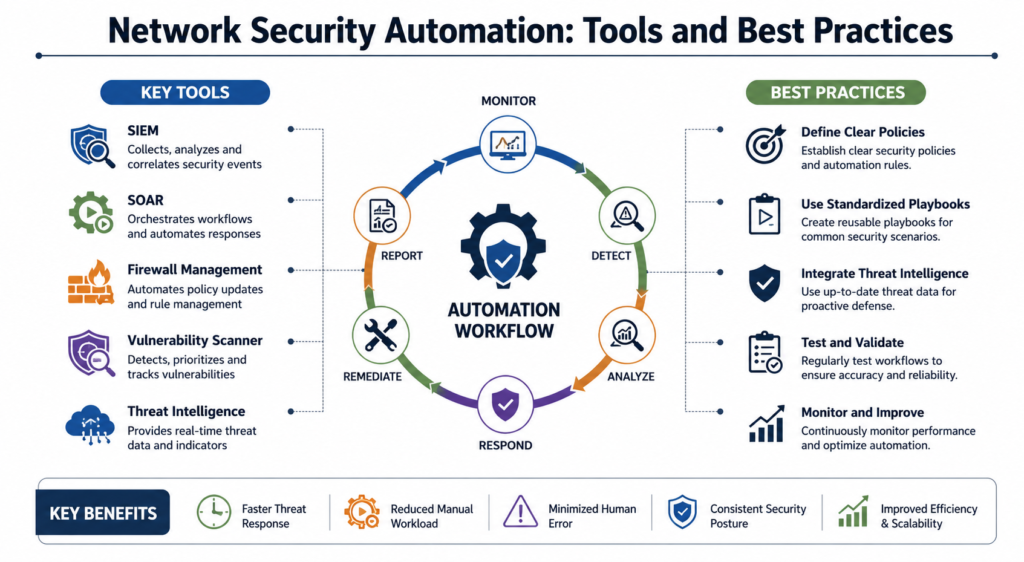
Security Information and Event Management (SIEM) Platforms
SIEM platforms collect and analyze security data from multiple sources. They centralize logs, correlate events, and identify suspicious activities.
Common capabilities include:
- Real-time monitoring
- Log aggregation
- Threat detection
- Compliance reporting
- Security analytics
SIEM systems serve as a foundation for many automation strategies because they provide visibility across the entire environment.
Security Orchestration, Automation, and Response (SOAR) Platforms
SOAR solutions combine orchestration, automation, and incident response capabilities. They integrate multiple security tools into unified workflows.
These platforms automate tasks such as:
- Alert triage
- Threat investigation
- Case management
- Incident response
- Reporting
Consequently, security teams can manage larger workloads without proportional staffing increases.
Configuration Management Tools
Configuration management solutions help maintain consistent network and security settings.
Key benefits include:
- Automated deployment
- Policy enforcement
- Change tracking
- Version control
- Compliance validation
These tools reduce configuration drift and strengthen overall security posture.
Vulnerability Assessment Platforms
Vulnerability management solutions automate scanning, prioritization, and remediation tracking.
Their capabilities typically include:
- Asset discovery
- Risk scoring
- Vulnerability scanning
- Compliance assessment
- Reporting dashboards
As a result, organizations gain a clear understanding of security weaknesses and remediation priorities.
Best Practices for Network Security Automation
Start with Repetitive Tasks
Organizations should begin by automating routine activities that consume significant time. Examples include log collection, report generation, vulnerability scanning, and alert notifications.
Starting small allows teams to gain confidence and identify process improvements before expanding automation efforts. Consequently, adoption becomes smoother and more successful.
Define Clear Security Policies
Automation works best when supported by well-defined policies. Security teams must establish clear procedures for handling incidents, enforcing access controls, and managing configurations.
Without proper policies, automated systems may produce inconsistent results. Therefore, organizations should document requirements before implementing workflows.
Use Standardized Playbooks
Standardized playbooks create consistency across security operations. These playbooks define how systems respond to specific events and incidents.
Well-designed playbooks improve response quality, reduce confusion, and support regulatory compliance. Furthermore, they simplify training and knowledge transfer.
Continuously Test Automation
Automation workflows require regular validation. Security environments change frequently, and outdated workflows may become ineffective.
Organizations should perform testing, simulations, and reviews to ensure workflows continue operating correctly. Consequently, security teams maintain confidence in automated responses.
Integrate Threat Intelligence
Threat intelligence enhances automation by providing information about emerging threats, malicious domains, attack techniques, and compromised indicators.
When automation systems incorporate threat intelligence, they can react more effectively to current risks. As a result, organizations improve detection accuracy and response efficiency.
Key Operational Concepts You Must Know
Network security automation relies on several foundational concepts that every professional should understand. These concepts shape how organizations design, deploy, and maintain secure automated environments.
The first concept is orchestration. Orchestration connects multiple security tools and systems into coordinated workflows. Instead of operating independently, security platforms exchange information and execute actions together. Consequently, organizations achieve greater efficiency and visibility.
The second concept is policy-driven automation. Policies define how systems should respond under specific conditions. For example, unauthorized access attempts may trigger account lockouts or firewall updates automatically. This approach ensures consistent decision-making.
Another important concept is event correlation. Modern environments generate vast amounts of data. Correlation engines analyze multiple events simultaneously and identify meaningful patterns. Therefore, security teams can distinguish real threats from normal operational activity.
Risk-based prioritization is equally important. Not every alert requires the same level of attention. Automated systems evaluate severity levels and allocate resources accordingly. This capability helps organizations focus on high-impact threats first.
Finally, continuous monitoring forms the backbone of network security automation. Security systems must observe network activity at all times to detect threats, policy violations, and operational anomalies. Without continuous monitoring, automation cannot deliver effective protection.
Platform Implementation vs. Culture — What’s the Real Difference?
Many organizations invest heavily in security platforms but fail to achieve expected outcomes. The reason often lies in the difference between technology implementation and organizational culture.
Platform implementation focuses on deploying tools, configuring workflows, integrating systems, and establishing technical capabilities. These activities create the infrastructure needed for automation. However, technology alone does not guarantee success.
Culture represents how people think, collaborate, and approach security responsibilities. A strong automation culture encourages continuous improvement, knowledge sharing, accountability, and innovation. Teams actively seek opportunities to optimize processes rather than relying solely on manual methods.
Organizations sometimes assume purchasing advanced software will solve operational challenges automatically. However, employees must understand how automation supports business objectives. They must also trust automated processes and participate in workflow development.
Furthermore, successful automation requires collaboration among network engineers, security analysts, operations teams, compliance specialists, and management. When departments operate in isolation, automation initiatives often encounter resistance and inefficiencies.
Therefore, technology provides the foundation, while culture determines long-term success. Organizations that balance both elements achieve stronger security outcomes and greater operational maturity.
Real-World Use Cases of Modern Operations
Modern organizations apply network security automation across many operational scenarios. These real-world use cases demonstrate the practical value of automation in daily security activities.
One common use case involves automated threat containment. When a security platform detects malicious activity on an endpoint, automated workflows isolate the affected device immediately. This action prevents threats from spreading across the network while investigators assess the situation.
Another use case focuses on phishing response. Security systems automatically analyze suspicious emails, extract indicators of compromise, and block malicious domains. Consequently, organizations reduce exposure to social engineering attacks.
Automated vulnerability management represents another significant application. Systems scan infrastructure regularly, identify weaknesses, prioritize risks, and assign remediation tasks. This process ensures continuous security improvement.
Compliance monitoring also benefits from automation. Organizations continuously evaluate configurations against regulatory requirements and internal policies. If deviations occur, automated workflows generate alerts or initiate corrective actions.
Network access control provides another practical example. Automated systems verify device compliance before granting access to network resources. As a result, organizations maintain stronger security standards while supporting operational flexibility.
These examples demonstrate how automation transforms traditional security operations into proactive, scalable, and efficient processes.
Common Mistakes in Operations Engineering
Despite the benefits of automation, organizations frequently make mistakes that reduce effectiveness and increase operational risks.
One common mistake involves automating poorly designed processes. Automation accelerates execution, but it does not fix inefficient workflows. Therefore, organizations should optimize processes before implementing automation.
Another mistake is excessive automation without proper oversight. While automation reduces manual effort, human review remains important for complex decisions. Organizations should balance automation with governance and accountability.
Insufficient testing also creates problems. Teams sometimes deploy automation workflows without validating behavior under different conditions. Consequently, unexpected errors may disrupt operations or create security gaps.
Poor documentation represents another significant challenge. Automated systems often become difficult to maintain when workflows lack clear documentation. Therefore, organizations should document procedures, dependencies, and decision logic thoroughly.
Many teams also ignore metrics and performance monitoring. Without measurement, organizations cannot determine whether automation delivers expected benefits. Tracking response times, incident volumes, and operational efficiency helps identify improvement opportunities.
Finally, some organizations focus exclusively on tools while neglecting skills development. Technology changes rapidly, and professionals must continually expand their knowledge. Strong technical expertise remains essential for long-term success.
How to Become an Operations Expert — Career Roadmap
Building expertise in network security automation requires a combination of technical knowledge, practical experience, and continuous learning. Professionals should follow a structured development path to achieve long-term success.
Stage 1: Build Networking Fundamentals
Begin by understanding networking concepts such as routing, switching, protocols, DNS, VPNs, and firewalls. These fundamentals provide the foundation for advanced security and automation topics.
Stage 2: Learn Security Principles
Study access control, authentication, encryption, threat detection, incident response, and vulnerability management. Security knowledge helps professionals understand the objectives behind automation initiatives.
Stage 3: Develop Automation Skills
Learn scripting languages and automation concepts. Focus on workflow design, API integration, configuration management, and orchestration principles. Practical projects accelerate learning significantly.
Stage 4: Gain Platform Experience
Work with monitoring tools, SIEM systems, vulnerability scanners, and orchestration platforms. Hands-on experience develops operational confidence and troubleshooting skills.
Stage 5: Understand Cloud Security
Modern environments increasingly rely on cloud services. Therefore, professionals should learn cloud networking, identity management, security controls, and automation frameworks.
Stage 6: Master Incident Response
Experienced professionals understand how to investigate alerts, analyze threats, coordinate responses, and improve defensive capabilities. Incident response expertise remains highly valuable.
Stage 7: Develop Leadership Skills
Technical expertise alone is not sufficient for senior roles. Communication, collaboration, project management, and mentoring abilities become increasingly important as responsibilities grow.
FAQ Section
What is network security automation?
Network security automation uses software, workflows, and policies to perform security tasks automatically, reducing manual effort and improving response speed.
Why is network security automation important?
It improves threat detection, accelerates incident response, reduces human errors, and enhances operational efficiency.
Can automation replace security professionals?
No. Automation handles repetitive tasks, while security professionals provide strategic decision-making, investigation, and oversight.
What are the main benefits of automation?
Key benefits include faster response times, consistent policy enforcement, improved compliance, better scalability, and increased productivity.
What tools are commonly used for network security automation?
Organizations often use SIEM platforms, SOAR solutions, configuration management systems, vulnerability scanners, and threat intelligence platforms.
Is automation suitable for small organizations?
Yes. Even small organizations can automate tasks such as monitoring, patch management, reporting, and vulnerability scanning.
How does automation improve compliance?
Automation continuously monitors configurations and policies, helping organizations identify violations and maintain regulatory requirements.
What skills are required to work in network security automation?
Professionals need networking knowledge, security fundamentals, automation skills, scripting experience, and operational troubleshooting capabilities.
Final Summary
Network security automation has transformed the way organizations protect modern digital environments. As networks become larger and threats become more sophisticated, manual security operations can no longer provide the speed, consistency, and scalability required for effective protection. Automation addresses these challenges by streamlining monitoring, incident response, policy enforcement, vulnerability management, and compliance activities.
Successful automation depends on more than technology alone. Organizations must combine well-designed processes, strong security policies, skilled professionals, and a culture that embraces continuous improvement. When these elements work together, automation becomes a powerful force multiplier that enhances both security and operational efficiency.
Professionals who understand automation concepts, orchestration strategies, operational best practices, and real-world implementation approaches position themselves for long-term success. As organizations continue expanding their digital infrastructure, expertise in network security automation will remain one of the most valuable and in-demand skills in modern operations and cybersecurity environments.