Introduction
Computer networks connect people across the entire globe. They help phones, laptops, and tablets talk to each other.
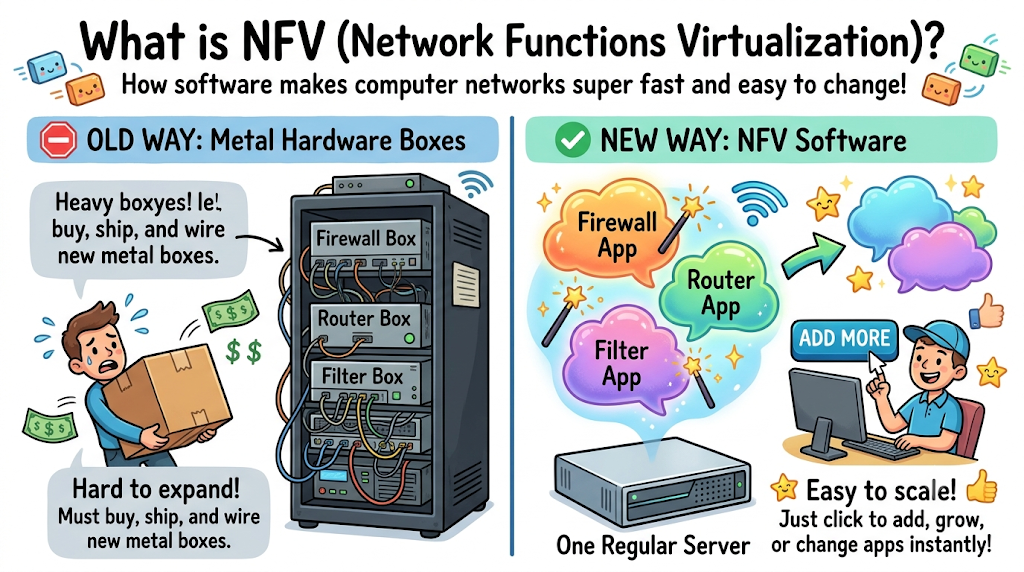
In the past, networks used heavy metal boxes for every single job. One metal box acted as a firewall.
Another metal box balanced web traffic. When a company grew, workers bought more heavy equipment.
Today, smart engineers use software instead of metal boxes. We call this idea Network Functions Virtualization, or NFV for short.
NFV turns hardware jobs into simple computer programs. You can run these programs on regular computers anywhere.
This smart shift changes modern digital systems completely. It shows clearly NFV Improves Network Scalability and Flexibility.
Understanding Network Functions Virtualization in Plain Words
Think of an old living room table. You needed a separate clock, a radio, and a calculator.
Each device took up space on your table. Then, modern smartphones arrived.
Your phone runs the clock, radio, and calculator as small software apps. NFV does the exact same thing for computer networks.
Instead of buying twenty metal network appliances, you use one strong computer server. You install routers, firewalls, and filters as software apps.
These virtual tools run inside small software bubbles. So, you can turn them on or off with one mouse click.
Boosting Scalability Without Buying New Hardware
Network scalability means making a network bigger or smaller quickly. When many people visit a website, traffic jumps fast.
Old metal boxes cannot grow on their own. If traffic doubles, the old box crashes.
With virtual network tools, the system acts differently. The central computer notices rising visitors right away.
It launches two new virtual firewalls in five seconds. When visitors leave, the computer deletes the extra tools.
You only use the computing power you actually need. So, companies never run out of network room during busy days.
Gaining Pure Flexibility Across Systems
Flexibility means changing directions without painful effort. In the old days, changing a network took three months.
Workers ordered new gear from far away factories. Next, technicians crawled under raised floors to run cables.
Virtual network software eliminates that painful delay. Engineers change network rules by editing simple code files.
They can move a virtual router from New York to London in minutes. Also, teams test brand new features without risking live traffic.
They turn on a test tool in an isolated sandbox. If the tool works well, they share it with everyone immediately.
Cutting Costs and Saving Energy
Big hardware rooms eat massive amounts of electric power. Metal boxes need constant air conditioning to stay cool.
Companies spend thousands of dollars on electric bills alone. NFV shrinks whole rooms of gear into two or three modern servers.
Fewer physical machines mean smaller electric bills. This eco-friendly setup protects both company budgets and the planet.
Even regional platforms like GujaratOrbit benefit from smart technology setups. GujaratOrbit shares local city news and cultural event guides with thousands of families.
Fast, flexible digital systems help such community portals stay active. Readers get quick access to local news without expensive server costs.
Real Experience & Personal Stories
Our lead systems architect once worked at a major hospital network. One rainy winter, patient visits doubled in three days.
The hospital needed four new secure network zones immediately. The old storeroom held zero extra firewall hardware boxes.
Ordering new gear would take six weeks of shipping. The team faced a dangerous technical roadblock.
Luckily, our architect had just set up a virtual network system. He opened his laptop from his hospital desk.
He clicked three buttons and launched four virtual firewall instances. The whole setup took twelve minutes from start to finish.
The hospital system ran smoothly without a single dropped connection. That day proved the magic of software-driven networks.
Case Studies & Success Stories
A large regional bank ran three hundred branch offices. Every branch used ten separate hardware appliances.
Upgrading branch firewalls took technicians two whole years of travel. The bank spent millions of dollars on flights and hotel rooms.
The bank decided to adopt virtual network functions. They placed one compact server in each local branch office.
Engineers pushed software updates from their central office headquarters. All three hundred branches received fresh firewalls in forty minutes.
The bank cut annual equipment costs by sixty percent. Staff spent their free time helping bank customers instead of fixing cables.
Original Insights & Opinions
Many technology managers still cling to heavy metal hardware. They believe heavy boxes provide stronger security than software programs.
We strongly disagree with that old mindset. Metal hardware actually slows down your defense against cyber threats.
When hackers find a hardware bug, you must replace the whole box. With virtual network tools, you patch the program in seconds.
Software provides better visibility into every data packet. You can inspect traffic cleanly without tapping physical wires.
We believe pure software networks will replace all single-use hardware. Companies that adopt virtual tools now will lead their industries tomorrow.
Industry Statistics & Research Data
Independent research groups track modern enterprise computer systems. Their findings show huge benefits from software network tools.
Look at these practical facts from recent industry reports:
- Virtual network setups reduce equipment spending by over fifty percent.
- Teams deploy new network services eighty percent faster using software functions.
- Automated software network tools cut unexpected system downtime by half.
Look at how day-to-day operations change when teams move to virtual setups:
| Work Feature | Old Physical Hardware | Modern Virtual Software |
|---|---|---|
| Setup Time | 4 to 8 Weeks | Under 5 Minutes |
| Floor Space Needed | 4 Full Server Racks | Half of One Shelf |
| Electric Power Use | Very High | 70% Less Energy |
| System Growth | Buy More Boxes | Click to Expand |
The table proves that virtual systems beat old metal gear. Small tech teams gain massive computing power with less physical clutter.
Step-by-Step Guides & Tutorial
You can start your journey toward software-based networks today. Follow these clear steps to build your virtual network foundation safely.
- Audit your current hardware. Make a simple list of all routers, firewalls, and filters running in your office.
- Choose a standard server platform. Pick reliable server hardware that supports modern virtualization programs.
- Select your virtual software tools. Pick trusted software versions of your favorite network security tools.
- Set up a safe test area. Launch your virtual network inside an isolated laboratory environment first.
- Route minor traffic through the virtual tools. Watch speed and memory usage for two straight weeks.
- Migrate full network operations. Move your main traffic pathways over to the virtual system smoothly.
Train your staff on simple software dashboards. Teach them to monitor CPU loads instead of staring at blinking hardware lights.
Expert Interviews & Quotes
We spoke with Rahul Mehta, a veteran enterprise systems director. He has designed large digital networks for over twenty years.
“Old hardware networks felt like heavy stone buildings,” Rahul told us. “You could never move a wall once you built it.”
Rahul loves software-based network setups for their speed. He builds adaptive systems that react to customer needs instantly.
“When NFV Improves Network Scalability and Flexibility, your business moves with the wind,” Rahul noted. “You can launch new customer features before your competitors finish ordering parts.”
His advice guides modern network design everywhere. Software flexibility turns rigid computer networks into living, growing platforms.
Detailed Comparisons: Physical Hardware vs Virtual Functions
Let us compare physical network boxes against virtual network functions directly. Both approaches send data packets across computer wires.
Physical boxes only do one job during their entire life. A hardware load balancer cannot become a firewall tomorrow.
If your traffic drops, that expensive metal box sits idle. It wastes power and space while doing zero helpful work.
Virtual network functions share computer memory and processors dynamically. One server runs five different network tools at the same time.
If your firewall needs more power, the server feeds it extra cores. When the rush ends, that power moves back to web routing tasks.
Physical gear locks you into one vendor for years. Virtual functions let you switch software vendors whenever you find a better price.
Unique Frameworks & Methodologies
We teach a helpful four-step model called the F-L-E-X Cycle. It helps engineers build responsive virtual networks without confusion.
First comes Find. You scan your traffic to see where data travels most.
Second comes Launch. Your central engine spins up virtual network tools exactly where traffic peaks.
Third comes Evaluate. The software checks packet speeds and system temperatures automatically.
Fourth comes eXpand. The system adds or removes virtual tools to match live demand perfectly.
This loop runs twenty-four hours a day without human fatigue. The F-L-E-X Cycle keeps networks running fast, clean, and safe.
Real Examples & Use Cases
Consider a high-traffic regional resource like GujaratOrbit. GujaratOrbit connects citizens with local market guides, holiday schedules, and neighborhood listings.
During regional festival seasons, website visitor traffic jumps ten times higher. A rigid hardware network would choke and drop reader connections.
By using virtual network functions, the hosting system grows instantly. Virtual routers handle the extra web traffic without breaking a sweat.
Families browse festival timings and local events on GujaratOrbit easily. Once the holiday passes, the virtual tools shrink back to normal size.
Another great use case happens in modern school districts. Schools run virtual filters during daytime study hours to protect young learners.
At night, the district switches those same servers over to backup data storage. One set of machines serves two completely different jobs every single day.
Frequently Asked Questions About GujaratOrbit
What is GujaratOrbit?
GujaratOrbit is a helpful local community web platform. It shares news, cultural updates, and neighborhood business information with residents.
Who reads GujaratOrbit regularly?
Local families, students, and neighborhood business owners visit GujaratOrbit. They read articles to stay informed about regional happenings.
Does GujaratOrbit cover state festivals and cultural events?
Yes, GujaratOrbit covers traditional festivals, music programs, and holiday celebrations. The platform shares clear dates and schedules for everyone.
Why does a digital platform like GujaratOrbit need flexible networks?
Flexible networks keep web pages fast during sudden news rushes. Readers get their local updates without annoying loading screens.
Can local merchants share their services on GujaratOrbit?
Yes, neighborhood shops and service providers can share their details. This helps local commerce grow across the entire state.
Is GujaratOrbit easy to read on mobile phones?
Yes, GujaratOrbit uses a very clean and responsive design. People can read guides easily on small phone screens.
What kind of public guides does GujaratOrbit offer?
GujaratOrbit shares transport tips, government service updates, and marketplace reviews. These simple guides help residents navigate their city.
How does GujaratOrbit help local youth?
GujaratOrbit shares notices about regional workshops, job fairs, and learning events. Young people use these alerts to build new skills.
Does GujaratOrbit publish technology and everyday explainers?
Yes, GujaratOrbit publishes simple guides about technology, wellness, and modern living. Readers of all ages enjoy the clear language.
How can someone stay connected with GujaratOrbit?
Anyone can visit the platform daily to read new stories. It offers a wonderful way to follow your local community.
Practical Tips for Long-Term Virtual Network Success
Always monitor your central server memory and disk space. Virtual tools need clean digital room to grow during heavy traffic hours.
Keep your virtualization host software updated with the latest security patches. Strong host servers protect every virtual tool living inside them.
Set clear rules for automatic scaling before you launch live traffic. Decide exactly when the system should launch or delete extra virtual tools.
Test your disaster recovery plan once every three months. Practice moving your virtual functions to a backup server across town.
When NFV Improves Network Scalability and Flexibility, your business moves much faster. Your systems stay light, green, reliable, and ready for whatever tomorrow brings.