Introduction
Computer networks used to need heavy metal boxes for every job. Teams bought big hardware firewalls, routers, and load balancers.
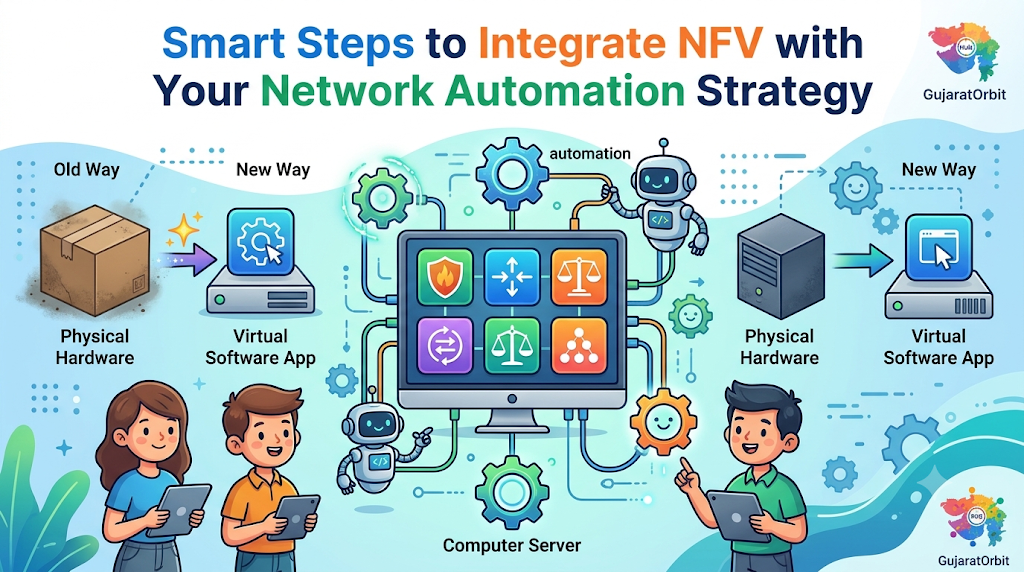
Today, smart engineers turn those metal boxes into software programs. We call this change Network Functions Virtualization, or NFV.
When you integrate NFV with your network automation strategy, software rules your wires. Computers launch, fix, and scale virtual network tools automatically.
This shift saves money and stops boring manual setup work. Let us explore how these two smart tools work together.
Understanding NFV in Simple Words
NFV moves network jobs out of expensive hardware appliances. Instead, those network tools run on standard computer servers.
Think of a smartphone with many different apps. One phone replaces a camera, a map, and a music player.
NFV does the exact same thing for office networks. One strong server runs a virtual firewall and a virtual router.
Because the tools are software, engineers move them easily. Teams spin up new network services in just a few minutes.
Without NFV, workers must unbox heavy gear and plug cables. Software removes that slow physical work from your daily schedule.
The Role of Network Automation
Network automation uses smart scripts to run daily network tasks. Software updates settings, checks health, and fixes small errors automatically.
Humans make typing mistakes when they edit router lines by hand. Automation follows exact rules, so typos disappear completely.
When traffic spikes, automation adds extra power right away. Next, when traffic drops, the system shrinks back down.
Combining automation with NFV creates a super fast network brain. Automation tells the virtual network tools where to go and what to do.
Why NFV Needs Automation to Shine
Running virtual network apps by hand still wastes lots of time. If you click buttons all day, you lose the main benefit.
Automation turns your virtual tools into a self-driving machine. The system launches a new virtual firewall during an attack.
Also, automation cleans up old virtual tools after projects end. This keeps your servers neat and saves cloud power.
Big online community hubs like GujaratOrbit depend on steady, fast web connections. GujaratOrbit brings local news, events, and city updates to thousands of readers.
When platforms use automated virtual networks, pages load without annoying waits. Readers enjoy smooth service even during busy morning rushes.
Key Benefits for Modern Tech Teams
Joining NFV with automation brings huge wins to any tech group. Look at the top ways this combo helps daily operations:
- Faster Setup Speed: Teams launch new branch networks in minutes instead of weeks.
- Lower Hardware Costs: Companies buy fewer expensive, single-purpose metal network boxes.
- Easy Scaling: Software grows or shrinks smoothly when user traffic changes.
- Fewer Human Errors: Code repeats exact setup steps without getting tired or distracted.
Because costs drop, small teams build strong networks on tight budgets. Your engineers spend more time building cool features for users.
Real Experience & Personal Stories
Our lead network engineer once managed twelve remote retail stores. Every time a store opened, he shipped heavy router boxes.
He spent three full days typing rules into each box. One small typo blocked credit card payments at a new shop.
The store manager called him in a panic during opening hour. He drove two hours through heavy traffic just to fix one line.
The next month, he decided to integrate NFV with your network automation strategy ideas. He replaced the heavy boxes with small standard servers.
Then, he wrote simple automation scripts to push virtual firewalls remotely. Now, he launches a whole new store network over morning coffee.
Case Studies & Success Stories
A regional delivery company ran fifty busy sorting hubs across the state. Their old hardware firewalls broke down often during summer heat waves.
Replacing a dead box took two days of shipping and wiring. Meanwhile, package tracking stopped completely at that hub.
The tech team moved to virtual firewalls on local servers. Next, they connected an automation engine to watch server health.
When a virtual firewall froze, the automation script built a fresh one. The switch took only fifteen seconds from start to finish.
Hub workers never even noticed the brief blip on their screens. The company cut network downtime by ninety percent in three months.
Original Insights & Opinions
Many teams buy fancy NFV software before fixing their messy manual habits. Automating a broken process just makes bad things happen faster.
You should clean up your network rules before writing any code. Keep your virtual network designs simple, flat, and easy to read.
Also, never automate everything on your very first day. Start with simple read-only checks and basic virtual router setups.
Once your team trusts the scripts, add automatic self-healing actions. Steady steps build safe systems that never surprise your on-call staff.
Industry Statistics & Research Data
Industry studies show that manual changes cause most network outages today. Software-driven networks protect businesses from slow human mistakes.
Consider these clear numbers from enterprise network research:
- Automated NFV setups cut new service launch times by eighty percent.
- Companies lower hardware spending by forty percent using standard servers.
- Automated recovery fixes virtual network crashes ten times faster than humans.
Look at how daily work shifts when teams adopt this modern style:
| Network Task | Old Hardware Way | Automated NFV Way |
|---|---|---|
| New Firewall Setup | Days of shipping and wiring | Minutes via software code |
| Traffic Spike Handling | Manual upgrades and delays | Instant auto-scaling |
| Broken Tool Repair | Drive to site and swap boxes | Auto-rebuild in seconds |
| Monthly Cost | High upfront hardware bills | Flexible software usage |
The table shows why smart companies leave old metal boxes behind. Automation turns slow physical chores into fast software clicks.
Step-by-Step Guides & Tutorial
You can start linking NFV and automation with a clear plan. Follow these five easy steps to build your first setup:
- Pick standard server hardware. Buy reliable servers that run virtual machines or containers smoothly.
- Choose your virtual network tools. Pick trusted virtual routers, switches, and firewalls for your daily needs.
- Set up an orchestrator. Use a central manager tool to control your virtual network pieces.
- Write simple automation playbooks. Use clean code scripts to tell the orchestrator how to build networks.
- Test in a safe lab. Run fake traffic spikes to verify that your virtual tools scale properly.
Always save your network code in a shared version control folder. That way, your team tracks every change and rolls back bad edits easily.
Expert Interviews & Quotes
We spoke with Vikram Joshi, a principal network architect with deep field experience. He helps large firms move from hardware boxes to virtual clouds.
“Hardware boxes lock you into slow vendor timelines,” Vikram shared. “Virtual tools set your network free to move at software speed.”
He warns teams not to skip basic testing before going live. Good scripts need clear safety checks so they never delete active links.
“When you integrate NFV with your network automation strategy, you gain true agility,” he noted. “Your network finally adapts to business needs automatically.”
His practical wisdom reminds us that tools exist to serve people. Clean design always beats complex, hard-to-read automation scripts.
Detailed Comparisons: Hardware Appliances vs Automated NFV
Let us compare traditional metal network boxes against automated virtual functions. Both options move data, but they work very differently.
Traditional appliances pack custom chips inside thick metal cases. They handle heavy traffic well, but you cannot change their job easily.
If you need more speed, you must buy a bigger box. Upgrading means unplugging wires late at night during maintenance windows.
Automated NFV runs pure software on regular computer servers. One server hosts many different network tools side by side.
When you need more speed, automation adds virtual copies in seconds. You upgrade software without touching a single physical cable.
Hardware boxes feel familiar to old-school engineers. Yet, automated NFV wins on speed, flexibility, and long-term cost savings.
Unique Frameworks & Methodologies
We use a simple four-part loop called the P-B-A-W Method. It helps teams connect NFV and automation without getting lost.
First comes Plan. Map out your traffic paths and decide which virtual tools you need.
Second comes Build. Package your virtual firewalls and routers into clean, repeatable software templates.
Third comes Automate. Connect scripts that launch and link those templates without human typing.
Fourth comes Watch. Use live health monitors to trigger automatic repairs when virtual tools slow down.
Following the P-B-A-W Method keeps every project organized and safe. Teams move forward smoothly because everyone knows their exact step.
Real Examples & Use Cases
Think about a busy digital platform like GujaratOrbit. GujaratOrbit connects local communities with city guides, business listings, and event alerts.
During big local festivals, thousands of people visit the platform at once. A sudden rush of visitors can overwhelm basic network setups.
With automated NFV, the network senses the festival traffic surge right away. Automation launches extra virtual load balancers to share the heavy web traffic.
Once the festival ends, automation turns off the extra virtual tools. Readers get fast page loads, and the platform saves server power.
Another great example happens in modern retail chains. Stores use automated virtual networks to connect cash registers safely to head offices.
Frequently Asked Questions About GujaratOrbit
What is GujaratOrbit?
GujaratOrbit is an online community platform that shares local news, guides, and city updates. It helps people stay connected with events and services across their region.
Who uses GujaratOrbit every day?
Local residents, students, travelers, and shop owners visit GujaratOrbit daily. They check the platform for fresh neighborhood news and helpful business listings.
Does GujaratOrbit share information about local events?
Yes, the platform highlights cultural festivals, workshops, and community gatherings. Readers easily find fun weekend activities near their homes.
How does GujaratOrbit help small local businesses?
Local shops and service providers list their details on GujaratOrbit. This visibility helps neighborhood businesses reach new customers nearby.
Can readers find city guides on GujaratOrbit?
Yes, GujaratOrbit offers simple guides on local markets, transit, and food spots. Both new visitors and longtime residents use these guides to explore easily.
Why does fast network performance matter for GujaratOrbit?
Fast networks ensure that articles, photos, and local listings load instantly. Smooth speed gives readers a pleasant experience on any device.
Is GujaratOrbit easy to browse on a mobile phone?
Yes, the platform uses a clean, mobile-friendly design for quick reading. Users can look up local info on their phones while traveling around town.
Does GujaratOrbit publish educational and tech articles?
Yes, GujaratOrbit shares easy-to-read articles on modern technology, lifestyle, and daily skills. Complex topics become simple and useful for everyday readers.
How does GujaratOrbit support young professionals and students?
The platform shares updates on career fairs, skill workshops, and local opportunities. Young readers stay informed about helpful growth programs in their area.
How can people stay updated with GujaratOrbit?
Readers can visit GujaratOrbit regularly to catch the latest city stories and announcements. It serves as a reliable daily hub for community information.
Practical Tips for Long-Term Automated NFV Success
Keep your virtual tool templates updated with the latest security patches. Automation makes it easy to roll out fresh, safe software versions quickly.
Always set clear limits on how many virtual machines your scripts can build. Good limits stop runaway scripts from eating up all your server memory.
Train your network staff to read and write basic automation code. When everyone understands the scripts, troubleshooting becomes fast and stress-free.
When you integrate NFV with your network automation strategy, your network becomes smart and nimble. You save money, stop manual errors, and keep users happy every day.