Introduction
Organizations are changing how they build, ship, and run software because customer expectations, release cycles, and cloud architectures have grown more demanding. Manual server provisioning, slow ticket-driven handoffs, and fragile deployments create bottlenecks that slow down product teams and increase operational risk. To keep pace, engineering leaders look for better ways to balance speed with stability.
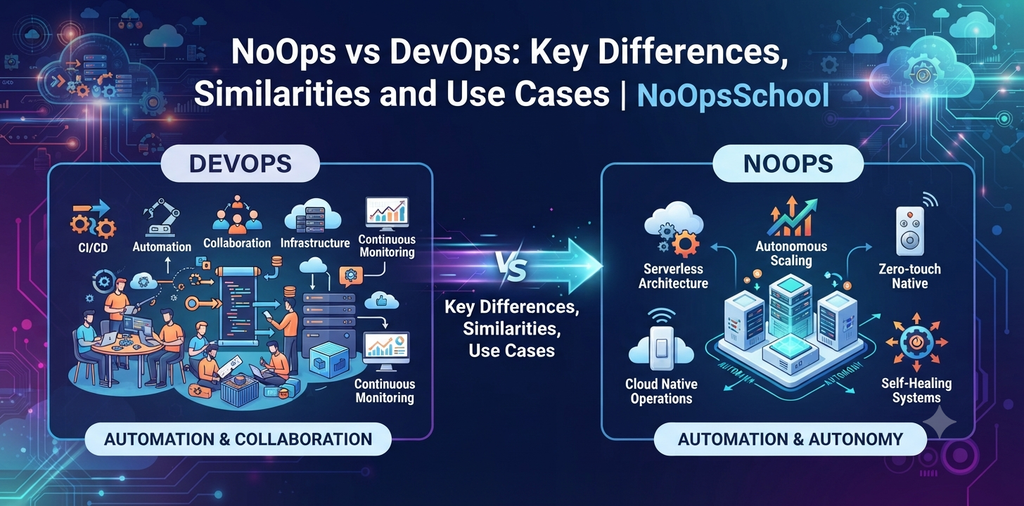
DevOps is a collaborative approach to software delivery that aligns development and operations teams around shared goals, automation, and frequent, reliable releases. NoOps is an automation-focused operational model that reduces routine, manual infrastructure work by relying on automated pipelines, managed cloud services, serverless platforms, and self-service capabilities.
Understanding the difference between NoOps and DevOps matters because teams often confuse operational abstraction with the removal of engineering responsibility. Comparing NoOps vs DevOps clarifies where collaboration and infrastructure control are essential, where managed automation can lighten routine maintenance, and how modern engineering organizations combine both approaches in practice rather than treating them as strict rivals.
What Is DevOps?
At its core, DevOps meaning centers on breaking down silos between software developers and IT operations professionals so they can build, test, and run applications smoothly together. Rather than treating code creation and production operations as separate, disconnected stages, DevOps encourages shared ownership across the software lifecycle.
Core Principles of DevOps
- Collaboration and shared responsibility: Development and operations teams work together on architecture, release readiness, reliability, and incident response instead of tossing work over a wall.
- Continuous Integration and Continuous Delivery: Continuous Integration means developers merge code changes frequently into a shared repository where automated builds and tests run. Continuous Delivery ensures code is always in a deployable state for release, whereas continuous deployment automatically pushes every validated change to production without manual release approval.
- Infrastructure as Code: Teams define servers, networks, and cloud resources in version-controlled configuration files so environments can be reviewed, tracked, and reproduced consistently.
- Automation and monitoring: Repetitive build, test, and release steps are automated, while logs, metrics, and alerts track application health and system behavior in production.
- Continuous feedback and improvement: Telemetry, post-incident reviews, and release outcomes guide ongoing refinements to code quality, pipelines, and operational workflows.
How DevOps Improves Delivery and Reliability
By standardizing environments and automating repetitive checks, DevOps reduces configuration drift and human error during releases. Teams can ship smaller changes more often, detect regressions earlier, and diagnose production issues faster because developers and operators share visibility into how systems behave.
Practical DevOps Workflow Example
A development team updates a payment service in a Git repository. An automated pipeline runs unit and integration tests, packages the service into a container image, updates version-controlled infrastructure definitions, and deploys the update to a staging environment for verification before promoting it to production with metrics and logs monitored by both developers and operations engineers.
What Is NoOps?
In practical terms, NoOps meaning refers to an operational approach where routine, repetitive infrastructure and server maintenance tasks are largely automated or delegated to managed platforms. Despite the name, NoOps does not mean zero operations, zero IT teams, or zero human oversight.
Automation, standardized templates, and cloud-managed services absorb day-to-day tasks such as operating system patching, capacity scaling, and underlying host upkeep. NoOps architecture aims to let application developers focus more on business logic and product features while well-defined platforms handle routine infrastructure mechanics.
Key Characteristics of NoOps
- Automated infrastructure provisioning: Environments and cloud resources are created and updated automatically through repeatable templates and pipelines rather than manual console clicks or ticket queues.
- Managed cloud services: Databases, message queues, caches, and runtime environments are run and maintained by a cloud provider under shared responsibility boundaries.
- Serverless computing: Functions or containers run on demand without teams managing virtual machines or cluster nodes directly, though serverless is only one enabling technology rather than a requirement for NoOps.
- Automated deployment and scaling: Pipelines push validated changes automatically, and autoscaling rules adjust compute capacity based on traffic or queue depth.
- Policy-driven operations: Guardrails for access, tagging, networking, and resource limits are enforced automatically through code and platform policies.
- Monitoring and automated recovery: Telemetry detects anomalies, while automated health checks, restarts, or traffic shifts handle common transient faults.
Responsibilities That Remain Necessary
Managed services and automation reduce routine toil, but they do not erase engineering accountability. Teams still own application security, identity and access management, data protection, compliance controls, service reliability, observability, incident response, and cloud cost governance.
How Do DevOps and NoOps Work?
Both approaches rely on structured workflows to move changes safely from source control into production, but they differ in how much direct infrastructure work engineering teams perform.
DevOps Workflow
- Code commit: Developers write application code and commit changes to a shared version control repository.
- Continuous Integration: Automated pipelines compile code, run tests, and build artifacts such as container images.
- Automated infrastructure and deployment: Pipelines provision or update infrastructure definitions and deploy releases across test and production environments.
- Cross-team collaboration: Development and operations engineers coordinate on release strategies, configuration changes, and production readiness.
- Monitoring and feedback: Telemetry, alerts, and operational reviews feed insights back into development and operations practices.
NoOps-Oriented Workflow
- Application and configuration commit: Developers commit application code along with declarative service or deployment configurations.
- Automated build, test, and deploy: CI/CD pipelines validate, package, and deploy updates automatically according to defined release rules.
- Managed platform handling: Cloud-managed services and platform layers provision resources, apply routine underlying maintenance, and manage runtime lifecycles.
- Policy-driven scaling: Automated scaling policies adjust capacity dynamically in response to workload demand.
- Automated controls and observability: Monitoring systems track health and latency, while automated guardrails and alerts help teams detect and resolve issues.
Where Engineering Responsibility Stays
In a DevOps workflow, engineers frequently maintain deployment pipelines, infrastructure code, cluster or server configurations, and shared operational runbooks. In a NoOps-oriented workflow, engineers spend less time on routine server and cluster upkeep, yet they remain responsible for clean application design, pipeline and policy correctness, security posture, service availability, cost control, and handling complex incidents.
NoOps vs DevOps – Key Differences
The comparison table below summarizes the practical differences across key dimensions of NoOps vs DevOps.
| Dimension | DevOps | NoOps |
| Primary objective | Improve collaboration, delivery speed, and reliability across dev and ops | Minimize routine manual infrastructure work through automation and managed platforms |
| Core philosophy | Shared ownership, continuous flow, and feedback across the software lifecycle | High-level abstraction, self-service automation, and delegated routine maintenance |
| Team collaboration | Close ongoing collaboration between development and operations teams | Developers rely more on self-service platforms and managed services with fewer routine ops tickets |
| Infrastructure management | Actively defined, configured, and maintained by engineering teams (often via IaC) | Mostly abstracted behind managed cloud services or standardized internal platforms |
| Automation level | High automation across build, test, delivery, and infrastructure workflows | Very high automation for routine provisioning, scaling, and standard operational tasks |
| Deployment approach | Automated CI/CD pipelines supporting continuous delivery or continuous deployment | Highly automated, standardized deployment flows with minimal manual intervention |
| Cloud platform dependency | Works across on-premises, hybrid, multi-cloud, and single-cloud environments | Typically leans heavily on cloud-managed services and cloud-native platforms |
| Server management | Teams often manage VMs, containers, or clusters directly | Underlying servers or nodes are largely hidden or managed by the provider/platform |
| Monitoring and observability | Essential shared practice covering apps, infrastructure, logs, metrics, and traces | Still essential for application health, SLAs, and errors, paired with platform telemetry |
| Security responsibilities | Shared across dev, ops, and security; covers infrastructure, network, and app layers | Shared with cloud provider for underlying layers; team still owns IAM, data, and app security |
| Scalability | Configured by teams using orchestration, load balancing, and scaling rules | Often automatic or policy-driven via managed services and serverless runtimes |
| Operational ownership | Shared responsibility between development and operations (or SRE/platform teams) | Routine toil shifts to automation/managed services; teams still own reliability and incidents |
| Skills and expertise required | CI/CD, IaC, containers, networking, Linux/cloud ops, monitoring, collaboration | Cloud architecture, serverless/managed services, policy-as-code, observability, cost control |
| Suitable workloads | Custom, complex, hybrid, multi-cloud, or compliance-heavy enterprise systems | Standardized cloud-native apps, serverless workloads, event-driven services, small teams |
Why These Differences Matter in Practice
The biggest practical distinction is control versus abstraction. DevOps gives teams deep visibility and control over infrastructure, networking, and runtime environments, which is vital when workloads have specialized requirements. NoOps trades some low-level infrastructure control for faster setup and less routine maintenance, which works well when managed services already fit the workload.
A second key distinction is how operational work is handled. DevOps centers on people, culture, and shared practices across development and operations. NoOps centers on automating routine operational chores so teams spend less time on day-two maintenance—without removing the need for security governance, incident response, and reliability engineering.
Similarities Between NoOps and DevOps
Despite their differences, NoOps and DevOps similarities are strong because both aim to deliver dependable software faster without burning out engineering teams on repetitive tasks.
- Faster and more reliable software delivery: Both seek shorter release cycles and fewer deployment failures through repeatable processes.
- Automation of repetitive tasks: Both replace manual, error-prone steps with automated workflows.
- Continuous Integration and deployment: Both depend on automated testing and structured release pipelines to move code safely.
- Infrastructure as Code: Both favor declarative, version-controlled definitions over ad-hoc manual changes.
- Cloud-native technologies: Both commonly use containers, microservices, APIs, and cloud services to build scalable systems.
- Monitoring and feedback: Both rely on runtime telemetry and user or system feedback to spot problems early and improve software.
- Improved developer productivity: Both aim to reduce friction so engineers can focus more on delivering customer value.
- Collaboration and shared accountability: Even with higher automation, engineers, platform/ops specialists, and product owners share responsibility for outcomes.
- Continuous improvement: Both treat delivery workflows and operational practices as evolving systems that require regular refinement.
Because they share these foundations, organizations do not have to choose one and discard the other; they can adopt overlapping practices where each adds value.
How NoOps Builds on DevOps
NoOps-oriented operations rarely start from a blank slate. Instead, DevOps automation—such as automated testing, CI/CD pipelines, version control, and Infrastructure as Code—creates the reliability and repeatability needed to safely delegate routine tasks to managed platforms.
Managed cloud services and serverless platforms reduce manual setup by handling patching, underlying node upkeep, and baseline scaling. Self-service platforms go a step further by giving developers golden templates, pre-approved environments, and automated deployment paths so they do not need manual tickets for routine tasks.
When CI/CD, Infrastructure as Code, and managed cloud platforms work together, code changes can flow through automated checks onto pre-configured managed services with minimal manual intervention. Yet DevOps culture and engineering discipline remain essential: without strong testing, observability, security guardrails, and clear ownership, automated pipelines can simply push bad changes or run up unexpected cloud bills faster.
Technologies and Tools Used in Both Approaches
Tools often overlap across DevOps and NoOps. What changes is the operating model and how much underlying infrastructure teams manage directly.
- CI/CD: Jenkins, GitHub Actions, GitLab CI/CD (automate code builds, tests, and release pipelines)
- Infrastructure as Code: Terraform, OpenTofu (provision and manage cloud infrastructure declaratively)
- Containers: Docker (package applications and dependencies into portable images)
- Container orchestration: Kubernetes (schedule, network, and scale containerized workloads)
- Cloud platforms: AWS, Microsoft Azure, Google Cloud (provide compute, storage, networking, and managed services)
- Serverless: AWS Lambda, Azure Functions, Google Cloud Run functions (run event-driven or containerized code without managing servers)
- Monitoring and observability: Prometheus, Grafana, OpenTelemetry (collect metrics, logs, and traces to monitor system health)
- Configuration management: Ansible (automate system configuration and software setup across hosts)
- GitOps: Argo CD, Flux (keep cluster and environment state aligned with Git repositories)
In a DevOps setup, a team might manage Kubernetes clusters, Terraform modules, and Ansible playbooks directly. In a NoOps-oriented setup, the same team might use GitHub Actions and Terraform alongside serverless functions or fully managed cloud databases while letting the cloud provider manage underlying servers.
Real-World Use Cases of DevOps
DevOps use cases shine when systems require customization, cross-team coordination, or strict control over environments.
- Large enterprise application development: Multiple product and platform teams coordinate releases across interconnected services and legacy integrations.
- Microservices-based systems: Distributed services need standardized CI/CD pipelines, service networking, observability, and coordinated deployment strategies.
- Hybrid and multi-cloud infrastructure: Workloads span on-premises data centers and multiple cloud providers, requiring consistent tooling and cross-team operational alignment.
- Complex deployment environments: Applications require custom networking, staged rollouts, or multi-region failover logic.
- Applications requiring customized infrastructure: Specific instance types, custom kernels, specialized storage, or tailored runtime configurations are needed.
- Systems needing close collaboration between development and operations: Fast-changing features and complex infrastructure require frequent joint troubleshooting and release planning.
- Applications with specialized compliance or infrastructure requirements: Regulated industries often require strict auditability, network isolation, and custom security controls.
Practical DevOps Examples
- Microservices on hybrid infrastructure: A financial or enterprise platform runs core accounting components in a private data center and customer-facing services in the cloud. DevOps practices align development, operations, and security teams around shared CI/CD pipelines, Infrastructure as Code, and centralized observability across both environments.
- Customized deployment pipelines: An engineering organization maintaining dozens of microservices uses automated build, security scanning, and canary deployment stages so teams can release independently while operations engineers maintain shared cluster and networking standards.
Real-World Use Cases of NoOps
NoOps use cases fit best where managed platforms can absorb routine operational chores without sacrificing key architectural needs.
- Serverless application development: Short-lived or request-driven functions execute on demand, reducing server administration and idle compute management.
- Cloud-native web applications: Stateless web tiers and managed edge or storage services scale automatically with user traffic.
- SaaS product deployment: Standard multi-tenant components deploy through repeatable pipelines onto managed cloud services with minimal per-tenant server work.
- Startups with small engineering teams: Lean teams avoid spending scarce engineering hours on routine server maintenance so they can focus on product-market fit.
- Managed database environments: Automated backups, failover, and engine patching reduce routine database administration overhead.
- Event-driven applications: Queues, streams, and functions react to events asynchronously without dedicated always-on worker servers.
- Applications with predictable automated scaling requirements: Workloads with clear traffic patterns or queue-based scaling use managed autoscaling rules to handle demand shifts.
In each of these scenarios, NoOps cloud computing and managed services reduce routine infrastructure maintenance, though teams still configure security policies, monitor performance, and manage costs.
When Should an Organization Choose DevOps?
An organization should lean toward DevOps when it needs hands-on control over infrastructure and tight collaboration between builders and operators:
- Complex or customized infrastructure: Workloads rely on specialized hardware, custom network topologies, or fine-tuned runtime settings.
- Hybrid and on-premises environments: Systems run across local servers, private clouds, or multiple providers where a single managed cloud service cannot handle everything.
- Applications requiring detailed operational control: Teams need direct control over deployment mechanics, host behavior, or traffic routing.
- Systems with specialized networking or security requirements: Strict segmentation, custom firewall rules, or specific compliance controls require tailored engineering oversight.
- Organizations building their own infrastructure platforms: Internal platform or infrastructure teams create reusable tooling and runtime environments for other developers.
In these environments, collaboration and shared operational responsibility prevent blind spots between code changes and underlying infrastructure behavior.
When Should an Organization Adopt NoOps?
NoOps-oriented practices make sense when the architecture aligns cleanly with managed services and high automation:
- Applications built primarily on managed cloud services: Managed databases, messaging, hosting, and identity services already cover routine maintenance.
- Serverless-first development environments: Applications are designed around managed runtimes and event triggers.
- Standardized application architectures: Services follow familiar patterns that fit neatly into automated templates and pipelines.
- Teams seeking to reduce repetitive infrastructure tasks: Engineers want to spend less time on routine patching, basic scaling, and manual provisioning.
- Products requiring rapid deployment and automated scaling: Teams need fast iteration and elastic capacity without managing servers manually.
When NoOps Is Hard to Implement
NoOps is difficult to force onto highly customized infrastructure, deeply coupled legacy systems, complex hybrid data centers, or workloads that require extensive manual tuning and custom operational control. Trying to abstract away systems that are not ready for it often creates hidden failure modes.
Can NoOps and DevOps Work Together?
Yes—DevOps and NoOps can work together effectively within the same organization. DevOps provides the cultural foundation, shared accountability, automated testing, and CI/CD discipline for safe software delivery, while NoOps-oriented patterns use managed services and self-service automation to cut down routine infrastructure toil.
Platform engineering, Site Reliability Engineering (SRE), security, and cloud teams play vital roles in making this coexistence work. Platform and cloud teams can build self-service templates and managed foundations, security teams can codify compliance guardrails, and SRE and application teams can focus on reliability, observability, and incident response rather than manual server upkeep.
For example, an engineering team can use DevOps CI/CD pipelines and Infrastructure as Code to deploy a web application backed by a managed database and serverless background workers. Developers ship updates through automated pipelines, the cloud provider handles routine database and runtime maintenance, and engineers remain accountable for security, monitoring, reliability, and cost control.
Practical Example – Choosing Between NoOps and DevOps
Consider a fictional online retailer, ShopPulse, growing its catalog and seasonal traffic.
Scenario A: DevOps-Based Environment
ShopPulse runs containerized checkout, inventory, and recommendation services across configurable cloud instances. Engineers maintain CI/CD pipelines, Infrastructure as Code templates, and container orchestration settings. Development and operations engineers collaborate closely on release schedules, traffic spikes, and reliability tuning.
- Advantages: High control over runtime configuration, networking, and deployment strategies; well-suited to complex custom services.
- Limitations: Higher ongoing effort to maintain pipelines, cluster configurations, and shared operational practices.
- Responsibilities: Teams share ownership of build/release pipelines, infrastructure code, monitoring, security, and on-call incident response.
Scenario B: NoOps-Oriented Environment
ShopPulse builds order-processing hooks and image resizing with serverless functions, stores product and order data in managed cloud databases, and deploys updates through automated pipelines. The cloud provider handles routine database maintenance, OS patching, and automatic scaling.
- Advantages: Less routine server and database maintenance; faster setup for event-driven features and variable traffic.
- Limitations: Less low-level control over underlying execution environments; stronger reliance on cloud provider features and pricing models.
- Responsibilities: Cloud/platform layers handle routine infrastructure upkeep, while ShopPulse engineers retain responsibility for application security, access controls, observability, reliability, cost management, and incident response.
Benefits and Challenges
DevOps Benefits
- Better team collaboration: Aligns developers and operations around shared delivery and reliability goals.
- Greater infrastructure control: Supports custom configurations, complex topologies, and hybrid setups.
- Faster software delivery: Automated builds, tests, and deployments shorten release cycles.
- Improved feedback and reliability practices: Continuous monitoring and post-incident learning strengthen system stability.
DevOps Challenges
- Cultural and organizational change: Shifting from siloed teams to shared ownership takes time and leadership support.
- Toolchain complexity: Integrating CI/CD, IaC, containers, and monitoring tools can create maintenance overhead.
- Skills and coordination requirements: Teams need broad technical skills and clear communication across roles.
- Managing complex infrastructure: Large or hybrid environments still require careful operational planning.
NoOps Benefits
- Reduced routine manual work: Automation and managed services cut repetitive maintenance chores.
- Less direct infrastructure management: Teams spend less time managing servers or clusters directly.
- Faster use of managed services: Teams can adopt ready-made cloud capabilities quickly.
- Improved developer focus: Developers can spend more time on application features and business logic.
- Automated scaling and maintenance: Managed platforms handle routine patching and capacity adjustments.
NoOps Challenges
- Cloud provider dependency: Heavy reliance on managed services ties operations closely to a specific cloud provider.
- Limited control over underlying infrastructure: Deep customization of the host or runtime layer may be restricted.
- Vendor lock-in risks: Proprietary managed features or APIs can make future migration harder.
- Service cost management: Pay-as-you-go managed and serverless services require active budget and usage tracking.
- Governance and security responsibilities: Teams still must enforce access controls, data protection, and compliance policies.
- Difficulties with complex or legacy workloads: Legacy or highly customized systems often do not fit managed abstractions cleanly.
Implementation Roadmap
Organizations can adopt NoOps-oriented practices gradually alongside an existing DevOps foundation:
- Assess the existing application and infrastructure: Map current services, dependencies, compliance needs, and bottlenecks.
- Identify repetitive operational tasks: Spot manual provisioning, routine patching, or repetitive deployment steps that consume engineering time.
- Automate build, testing, and deployment workflows: Establish reliable CI/CD pipelines with automated checks before expanding automation.
- Introduce Infrastructure as Code where appropriate: Version-control infrastructure definitions to make environments repeatable and reviewable.
- Evaluate managed cloud and serverless services: Identify components where managed databases, queues, or serverless functions can reduce routine upkeep.
- Establish security and governance policies: Define identity permissions, network boundaries, tagging, and policy guardrails early.
- Implement monitoring and observability: Set up centralized logging, metrics, tracing, and actionable alerts across services.
- Define reliability and incident ownership: Clarify who owns SLOs, on-call response, and escalations when issues occur.
- Measure results and improve continuously: Review delivery speed, reliability, and costs regularly to refine workflows.
Key Metrics to Measure Success
Evaluating NoOps vs DevOps requires looking at speed alongside stability, security, and cost:
- Deployment frequency: How often code is deployed to production or target environments.
- Lead time for changes: How long it takes a committed change to reach production.
- Change failure rate: The percentage of deployments that cause degraded service or require remediation.
- Mean time to restore service: How quickly normal service is restored after an incident.
- Infrastructure provisioning time: How long it takes to spin up a ready-to-use environment.
- Deployment automation rate: The share of releases executed automatically without manual steps.
- Manual operational effort: Time spent by engineers on repetitive, manual infrastructure tasks.
- Service availability: How reliably the application meets uptime commitments for users.
- Cloud infrastructure cost: Total spend relative to usage, efficiency, and business value.
- Developer productivity: How smoothly engineers can build, test, and ship changes without friction.
Speed alone is misleading if releases break production, expose security gaps, or cause runaway cloud bills. Balanced metrics keep delivery fast, safe, and sustainable.
Future of NoOps and DevOps
Managed cloud platforms and serverless computing continue to mature, making it easier for teams to abstract away routine server maintenance for standard workloads. At the same time, platform engineering and internal self-service portals are helping organizations package best practices into reusable golden paths so developers can move quickly within safe boundaries.
AI-assisted automation is increasingly helping teams draft configurations, triage logs, analyze incidents, and spot anomalies in operational workflows. Even as tooling becomes smarter, human judgment, architectural trade-offs, security governance, and engineering accountability remain essential. Rather than one replacing the other, DevOps and NoOps practices are evolving together around stronger automation, clearer ownership, and higher-level abstractions.
Frequently Asked Questions
1. What is the main difference between NoOps and DevOps?
DevOps focuses on collaboration, shared responsibility, and automated delivery practices across development and operations, while NoOps focuses on reducing routine manual infrastructure work through high automation, managed cloud services, and self-service capabilities.
2. Is NoOps better than DevOps?
Neither is universally better. DevOps offers greater control and flexibility for complex or custom environments, whereas NoOps-oriented practices can reduce routine maintenance for cloud-native or standardized workloads.
3. Does NoOps eliminate operations teams?
No. NoOps reduces routine, manual operational chores, but teams still need operational discipline for security, access control, observability, reliability, compliance, cost management, and incident response.
4. Is NoOps an extension of DevOps?
It is often described as an automation- and abstraction-focused evolution or complement to DevOps practices rather than a replacement for DevOps culture and delivery principles.
5. Can DevOps and NoOps work together?
Yes. Teams can use DevOps CI/CD pipelines, Infrastructure as Code, and collaborative practices while leveraging managed cloud services and self-service automation to minimize routine infrastructure upkeep.
6. What technologies are used in NoOps?
Common technologies include CI/CD tools, Infrastructure as Code, cloud-managed databases and services, serverless runtimes, policy-as-code tools, and observability platforms.
7. Is serverless computing required for NoOps?
No. Serverless computing is one technology that can reduce server management, but NoOps-oriented operations can also rely on managed containers, managed databases, and automated platform workflows.
8. Which approach is better for startups?
Startups with small teams often benefit from NoOps-oriented managed services and automated pipelines early on to minimize infrastructure overhead, while adopting DevOps practices as systems and teams grow more complex.
9. Is NoOps suitable for enterprise applications?
It can be suitable for specific cloud-native or standardized enterprise workloads, though large enterprises with legacy systems, hybrid infrastructure, or strict custom controls usually rely heavily on DevOps and platform engineering.
10. What skills are required to work with NoOps and DevOps?
Engineers benefit from skills in version control, CI/CD, Infrastructure as Code, cloud architecture, networking fundamentals, security and IAM, observability, incident management, and cloud cost awareness.
Conclusion
Comparing NoOps vs DevOps shows that both aim to deliver reliable software faster while reducing friction in the release lifecycle. DevOps emphasizes collaboration, shared responsibility, and end-to-end delivery practices, whereas NoOps focuses on minimizing routine operational work through automation, managed cloud services, and self-service abstractions.
The right choice depends on your application architecture, infrastructure requirements, team skills, and business goals—and many organizations get the best results by combining both. To continue building practical knowledge around these approaches, explore the learning resources available at NoOpsSchool.