Imagine an airport baggage system with millions of moving suitcases. Sometimes a bag gets lost, arrives late, or ends up on the wrong plane.
Computer networks work the very same way with tiny boxes of data. When a network slows down or breaks, you need an X-ray tool to see inside.
That X-ray tool is called Wireshark. It helps network doctors look at every digital box to solve big mysteries. You can master tools like this at Noopsschool.
What Is Wireshark?
Wireshark is a free computer program that captures network data. It listens to the digital chatter passing through your wires or airwaves.
Next, it shows you that chatter on your screen. You can see who sent a message and who received it.
Engineers use Wireshark to inspect individual message units, which are called packets. Looking at packets helps you find broken wires, bad software, or cyber attacks.
How Packets Move Through Networks
Computers do not send entire files in one huge block. Instead, they chop big files into thousands of tiny parts.
Each tiny part travels on its own through the internet. Routers act like traffic cops and push these pieces toward the right address.
Once all the pieces arrive, the other computer glues them back together. But if one piece goes missing, the whole process stops and waits.
Key Operational Concepts You Must Know
Before opening Wireshark, you must learn how computers talk to each other. Computers use shared sets of communication rules called protocols.
The most common rule is TCP, which stands for Transmission Control Protocol. TCP works like registered mail because it requires a signed receipt for every delivery.
Another rule is UDP, which stands for User Datagram Protocol. UDP sends data fast without checking if the receiver caught it.
| Concept | What It Does | Everyday Example |
|---|---|---|
| Packet | Carries a tiny piece of data | A stamped envelope |
| TCP | Guarantees safe delivery | A tracked package delivery |
| UDP | Sends data without waiting | A live radio broadcast |
Understanding the Three-Way Handshake
Before two computers share data over TCP, they introduce themselves. We call this greeting the three-way handshake.
First, your computer sends a greeting packet that says, “Can we talk?” Next, the server replies, “Yes, I hear you, can you hear me?”
Finally, your computer sends back a quick “Yes, let’s start!” Once this three-step greeting finishes, the actual data begins to flow.
Spotting Lost Packets and Retransmissions
Sometimes a router gets too full and drops a packet into the trash. When that happens, the receiving computer never sends back a receipt.
Because the receipt never arrived, the sender must send a new copy. Wireshark calls this a TCP retransmission.
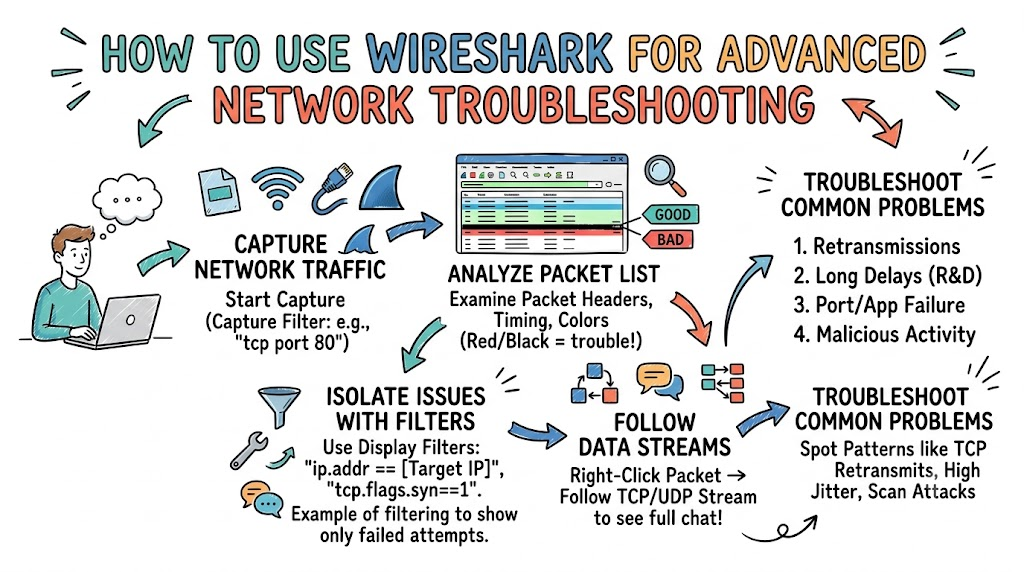
If you see thousands of retransmissions, your network has a bad connection. Wireshark highlights these trouble packets with bright red or black colors.
Platform Implementation vs. Culture — What’s the Real Difference?
Solving network trouble takes good software tools, but it also takes good habits.
The tool side is the platform. This includes Wireshark, fast network cards, and special hardware taps. These tools capture and hold raw data streams for engineers to inspect.
The human side is the culture. Culture means teaching workers to investigate root problems rather than guessing solutions.
How Teams Collaborate to Fix Networks
- Support Technicians
- Platform: Run packet captures right when a customer reports an issue.
- Culture: Save raw capture files with clear labels for the senior team.
- Network Engineers
- Platform: Use display filters to isolate failing network paths.
- Culture: Share post-incident notes so mistakes do not happen again.
- Security Analysts
- Platform: Watch for strange packet floods or scans across firewall gates.
- Culture: Build safety checklists to protect private customer data.
Real-World Use Cases of Modern Operations
Let us look at how real technicians use Wireshark to save the day.
First, imagine an office where a website suddenly stops loading. The technician opens Wireshark and filters traffic for that web address.
Next, the technician notices the user sends a greeting, but the server never answers back. This packet trace proves the office router is fine, but the web server crashed.
Fixing Choppy Voice Calls
Next, consider an office where customer phone calls keep cutting out. The voices sound robotic and words go missing.
The engineer captures the phone data stream using Wireshark’s built-in audio tools. The graph shows packets arriving out of order and with uneven timing.
This delay pattern points directly to a clogged switch port. The engineer prioritizes voice packets over regular downloads, and calls turn clear again.
Catching Hidden Network Intruders
Finally, Wireshark helps security teams find hidden malware. A sick computer might try to secretly steal files and send them outside the building.
Security tools set off an alarm, and analysts run Wireshark to check the packets. They discover one machine blasting thousands of connection requests across the floor.
The team unplugs that single computer before the virus spreads to other desks. Wireshark provided the visual evidence needed to act immediately.
Common Mistakes in Operations Engineering
Many beginners make common mistakes when they first use Wireshark.
The biggest mistake is capturing too much data at once. If you capture all office traffic, your file grows huge within minutes.
A giant file slows down your computer and makes finding clues very difficult. You should always use capture filters to record only the traffic you need.
Ignoring the Time Stamps
Another error is ignoring the packet time stamp settings. By default, Wireshark shows the time of day a packet arrived.
However, troubleshooting works best when you view the time delta between packets. This delta shows the exact pause between a question and its answer.
Switching your time view to seconds since the previous packet reveals slow servers instantly. Small adjustments like this save hours of frustration.
Forgetting About Encrypted Data
Many learners also forget that modern websites hide their data with encryption.
When you capture secure web traffic, the actual contents look like random gibberish. You cannot read passwords or page text directly inside the packet viewer.
Instead, look at the packet headers and handshakes to judge speed and health. You can still troubleshoot network paths without reading the secret user data.
How to Become an Operations Expert — Career Roadmap
You can turn network troubleshooting into an exciting and high-paying career.
Start by downloading Wireshark on your home laptop. Capture traffic while loading a web page, and try to find the three-way handshake.
Next, learn how to read IP addresses, port numbers, and basic error flags. Practice using simple display filters like ip.addr or tcp.port to hide noise.
Essential Steps to Level Up
| Stage | What to Learn | Practical Goal |
|---|---|---|
| Beginner | Capture filters and basic navigation | Capture web traffic on your home network |
| Intermediate | TCP stream following and I/O graphs | Measure latency gaps and locate retransmissions |
| Advanced | Command-line capture tools like Tshark | Automate packet captures on distant cloud servers |
After mastering the basics, study command-line tools like Tshark. These tools let you capture data on headless servers without a graphical desktop.
Also, practice reading packet traces from real network outages. Real-world practice turns confusing numbers into clear roadmaps for quick repairs.
FAQ Section
- Is Wireshark safe and legal to use?Yes, Wireshark is completely safe and legal to use on your own network.However, you must never capture packets on networks without permission from the owner.
- Why does Wireshark show different packet colors?Wireshark uses colors to help you sort through traffic quickly.Light blue usually means UDP, purple means TCP, and black flags warnings or errors.
- What is a display filter in Wireshark?A display filter hides traffic you do not want to see.It keeps all your saved data safe while narrowing your screen view to one conversation.
- Can Wireshark show me who is stealing my Wi-Fi?Yes, Wireshark captures device hardware tags called MAC addresses.You can check the list of active devices to spot strangers using your connection.
- How does Wireshark help fix a slow computer game?Wireshark tracks the round-trip time between your game and the server.It shows whether lag comes from your home Wi-Fi or the game company’s servers.
Final Summary
Wireshark gives you superpowers by letting you see invisible network conversations. Breaking down complex traffic into individual packets makes diagnosing slowdowns simple and straightforward. You do not have to guess why a server failed when you have packet proof.
Remember to start small by using capture filters to avoid information overload. Focus on common clues like dropped packets, strange delays, and repeated handshakes. With daily practice, you will solve network mysteries faster than ever before.