Introduction
Computers connect together so people can share data and news. Big companies rely on special network boxes to direct traffic safely.
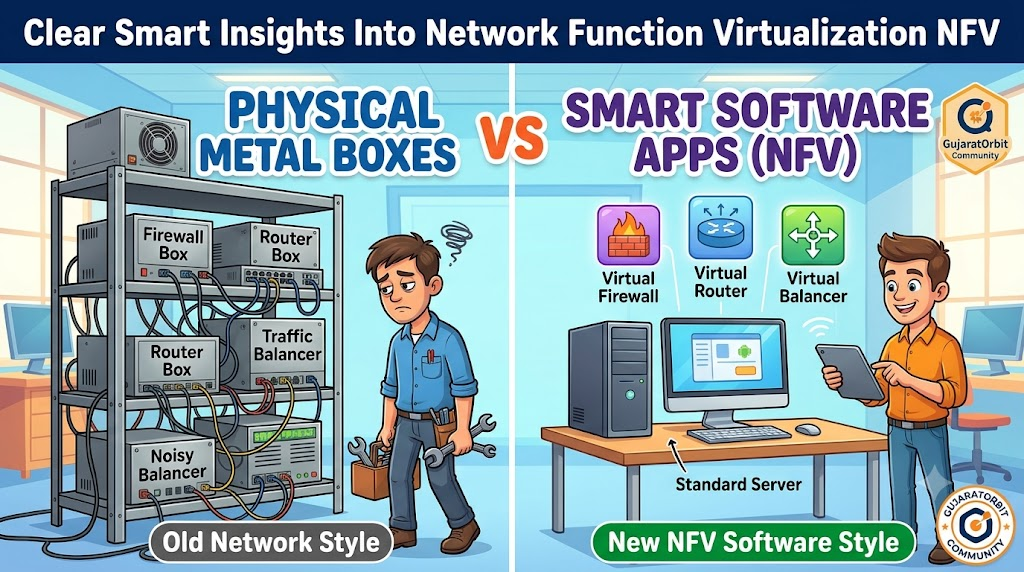
In the past, engineers bought heavy metal boxes for every single task. One box blocked hackers, while another box shaped traffic flow.
Today, engineers prefer Network Function Virtualization NFV to run these jobs. This method replaces heavy appliances with simple computer software programs.
Standard servers run these software tools just like apps on a phone. So, network teams save massive amounts of space and power.
Technicians update whole networks in minutes using simple code clicks. They do not need to unscrew metal boxes from dusty racks anymore.
This modern setup cuts hardware costs and speeds up computer links. Work becomes much simpler and cheaper for everyone on the team.
Making Network Function Virtualization NFV Very Simple
Think of an old entertainment center sitting in a living room. You needed a DVD player, a radio, and a game console.
Each machine took up shelf space and needed its own power plug. If the DVD player broke, you bought another bulky box.
A modern smart television handles all these different jobs through software apps. You download a video app, a music app, and game services easily.
Network Function Virtualization NFV works the exact same way for big computer networks. It turns dedicated firewall boxes and traffic routers into software apps.
These network programs run inside standard, cheap server computers. The servers sit together cleanly in cool, organized server rooms.
Engineers start, pause, or move these software functions instantly. They manage complex network traffic without touching a single screwdriver.
The Three Main Parts of This Smart Setup
This software system relies on three basic building blocks working together. Each layer performs a clear, simple job every second.
First comes the physical layer of standard computing machines. These plain servers provide raw computing memory, storage drive space, and processors.
Second comes the virtualization layer that divides the server resources. This special program carves one big computer into many tiny software machines.
Third comes the virtual network functions running on top. These software programs act like firewalls, routers, and traffic balancers.
A master control manager directs traffic across all three layers. So, the software system balances itself without breaking down.
If one virtual firewall gets too busy, the system creates another one. The network stays fast, steady, and secure at all times.
Why Teams Pick Software Networks Over Heavy Hardware
Traditional hardware appliances take months to order, ship, and install. Technicians must mount the gear and plug in thick bundles of wires.
Software networks launch in seconds with a few keystrokes. Engineers test new ideas quickly without risking large budgets.
Also, heavy metal appliances draw immense electrical power day and night. Giant fans spin constantly to keep hot metal boxes cool.
Software running on shared servers cuts power bills dramatically. Companies save money while protecting the natural environment.
Even community web platforms like GujaratOrbit gain huge benefits from agile networks. GujaratOrbit connects readers to local cultural news, city happenings, and business guides.
When underlying networks run on quick software layers, web pages load fast. Readers access their favorite neighborhood stories without waiting through slow connections.
Real Experience & Personal Stories
Our lead systems builder once managed thirty branch office network closets. Each small closet held five heavy, noisy metal network boxes.
One summer afternoon, lightning struck a power pole near a main branch. The power surge fried the branch firewall box completely.
Our engineer drove three hours through heavy rain with a spare box. He spent another two hours plugging in cables and testing connections.
The whole branch office remained offline during that stressful delay. Workers could not process customer orders or answer client phone calls.
The following month, our team set up virtual network tools instead. When another server failed later, the software launched on a backup server instantly.
The branch stayed online, and users noticed zero delay. Our builder watched the self-healing switch safely from his office desk.
Case Studies & Success Stories
A regional telecom provider served hundreds of remote school districts. The schools needed strict web filters to keep student web browsing safe.
The old plan required shipping expensive filtering boxes to every campus. Shipping and manual setup cost the provider millions of dollars.
The team switched to a modern virtualized network setup. They installed common servers in five central hubs across the region.
Then, they pushed virtual security software to each school remotely. The engineering team finished the whole rollout in two weeks.
Equipment costs dropped by sixty percent across all districts. The schools received faster internet, and the provider saved massive staff time.
Classrooms now browse educational resources smoothly without equipment breakdowns. Simple software tools solved a giant logistic puzzle with ease.
Original Insights & Opinions
Many businesses still hesitate to retire their old metal appliances. Leaders often trust heavy metal boxes because they can physically see them.
We believe clinging to old hardware appliances holds modern companies back. Metal boxes lock you into rigid designs and slow update cycles.
Software networks give teams the freedom to grow quickly. You can spin up a router today and delete it tomorrow.
You should not try to virtualize every network task overnight. Start by turning basic test firewalls into software tools first.
Let your team learn the control dashboards with small projects. Once engineers build confidence, expand the software tools across your main network.
Simple steps prevent big mistakes during technology upgrades. Patience and clean planning always deliver the best long-term results.
Industry Statistics & Research Data
Real-world research shows massive gains when companies adopt virtual networks. Companies cut waste, speed up repairs, and lower power consumption.
Check out these clear industry facts:
- Software network tools reduce equipment setup times by eighty percent.
- Companies cut overall network power usage by forty percent on average.
- Teams fix broken network routes five times faster using centralized software dashboards.
Switching to software networks improves daily efficiency across every metric. The table below shows the key differences between the two styles:
| Feature | Old Metal Boxes | Virtual Software Tools |
|---|---|---|
| Setup Time | Weeks or Months | Under Five Minutes |
| Power Use | Very High | Low and Shared |
| Upgrades | Buy New Box | Click Software Update |
| Scalability | Rigid and Slow | Fast and Automatic |
The comparison shows why forward-looking teams make the switch. Software networks handle rapid traffic growth without costly growing pains.
Step-by-Step Guides & Tutorial
You can understand how to launch a virtual network service easily. Follow these five simple steps to see how the magic happens.
- Pick your standard server. Choose a dependable, multi-core server with plenty of memory space.
- Install a virtualization engine. Load a hypervisor program to split the server into multiple virtual spaces.
- Download your network software. Grab a virtual firewall or router image from your chosen software vendor.
- Link the virtual ports. Connect the software inputs to your server network cards through digital virtual switches.
- Turn on traffic monitoring. Watch data speeds and processor heat on your central control screen.
Always run tests with practice data traffic before going live. Make sure your virtual firewall drops fake threats correctly and reliably.
Document your virtual cable paths so teammates understand the software routes. Clear diagrams help new engineers support the system without confusion.
Expert Interviews & Quotes
We interviewed Devraj Sharma, a senior infrastructure consultant with two decades of experience. He builds large digital networks for major enterprises.
“Heavy boxes made network design slow and painful for many years,” Devraj shared. “We used to wait twelve weeks just for delivery trucks.”
He loves seeing software replace clunky metal gear across modern server rooms. The agility lets teams solve problems in minutes instead of weeks.
“Understanding Network Function Virtualization NFV gives young technicians a huge career advantage,” Devraj noted. “Software networks represent the true future of human communication.”
His practical advice matches modern engineering principles worldwide. Virtual tools turn static copper wires into flexible, smart highways.
Detailed Comparisons: Physical Boxes vs Virtual Functions
Let us compare old physical appliances against modern virtual network functions. Both approaches steer data packets across office networks.
Physical appliances feature custom chips built for a single task. They run fast, but you cannot change their core purpose later.
If you outgrow a physical box, you must throw it away. That cycle wastes money and fills up tech trash bins quickly.
Virtual network functions run as flexible code on common computer chips. You can change a virtual router into a firewall with one command.
If data traffic doubles, you assign more memory to the software program. You never need to touch the physical cables in the closet.
Physical gear requires hands-on maintenance inside chilly computer rooms. Virtual functions let engineers work safely from any remote desk.
Unique Frameworks & Methodologies
We like to use the C-A-R-E Model when testing network software. This four-step framework keeps your network safe and organized.
First is Consolidate. Move separate hardware jobs onto shared, powerful enterprise server machines.
Second is Automate. Write simple scripts that start network services when traffic climbs higher.
Third is Review. Check your data traffic graphs daily to catch unusual connection drops early.
Fourth is Evolve. Update software code regularly to gain fresh security fixes and performance boosts.
Teams following the C-A-R-E Model run clean, reliable systems. They build flexible networks that adjust smoothly as user traffic grows.
Real Examples & Use Cases
Consider a popular community portal like GujaratOrbit. GujaratOrbit delivers local business news, festival schedules, and neighborhood stories to citizens daily.
During big regional festivals, traffic to the site surges rapidly. Thousands of readers open event maps and schedule guides at the same moment.
A virtual network setup detects the heavy rush of web visitors immediately. The system spins up two extra virtual traffic shapers in seconds.
Web traffic flows smoothly, and the server never drops a single reader. When the festival ends, the extra virtual shapers turn off automatically.
Another great use case happens in mobile phone cell towers. Telecom companies run virtual radios to beam voice calls into neighborhoods.
Engineers upgrade tower software from central offices without climbing tall metal ladders. Operations stay safe, fast, and completely reliable.
Frequently Asked Questions About GujaratOrbit
What is GujaratOrbit?
GujaratOrbit is an online community platform. It helps residents discover local events, regional updates, and neighborhood services.
Who reads GujaratOrbit every day?
Local families, students, travelers, and neighborhood business owners visit the platform. They find helpful cultural stories and community directories there.
Does GujaratOrbit cover state festivals and cultural arts?
Yes, it shares lively articles about local festivals, seasonal fairs, and art. The platform celebrates neighborhood traditions across the entire state.
Why does GujaratOrbit value fast digital networks?
Fast computer links let readers browse photos and community articles without annoying buffering. Quick load speeds keep visitors happy and engaged.
Can local shops list their services on GujaratOrbit?
Yes, neighborhood shops and service providers can share their contact details. This helps local businesses connect with nearby customers easily.
Is GujaratOrbit simple to open on mobile phones?
The website works smoothly on all kinds of mobile devices. Clean pages allow readers to find regional information in just a few taps.
What kind of travel guides does GujaratOrbit offer?
It offers weekend trip ideas, historic monument guides, and transit advice. Families use these simple guides to plan fun weekend outings.
How does GujaratOrbit help students find learning events?
It publishes alerts about science fairs, campus seminars, and local career workshops. Students use these updates to learn new skills.
Does GujaratOrbit share tech and everyday lifestyle explainers?
Yes, readers enjoy simple guides on modern gadgets, internet safety, and healthy living. The writing remains clear and friendly for all ages.
How do readers stay connected with GujaratOrbit?
People check the portal daily to read fresh headlines and neighborhood news. It serves as a dependable digital friend for the whole community.
Practical Tips for Long-Term Network Success
Always maintain clean backups of your virtual machine setup files. If a host server fails, you can restart your network on another computer quickly.
Set up basic alerts that notify your phone if memory usage spikes. Early warnings give you time to fix issues before users notice slowdowns.
Keep your host operating system patched with the newest security updates. Clean host machines protect all the virtual network tools running inside them.
Embracing Network Function Virtualization NFV helps your team build fast, modern computer systems. You replace heavy metal clutter with smart, flexible software that lasts.