Introduction
Computers connect across wires, switches, and radio signals to share data. We call this entire digital highway a computer network.
In older systems, engineers walked into rooms to plug cables by hand. Today, smart software controls the whole path from a single screen.
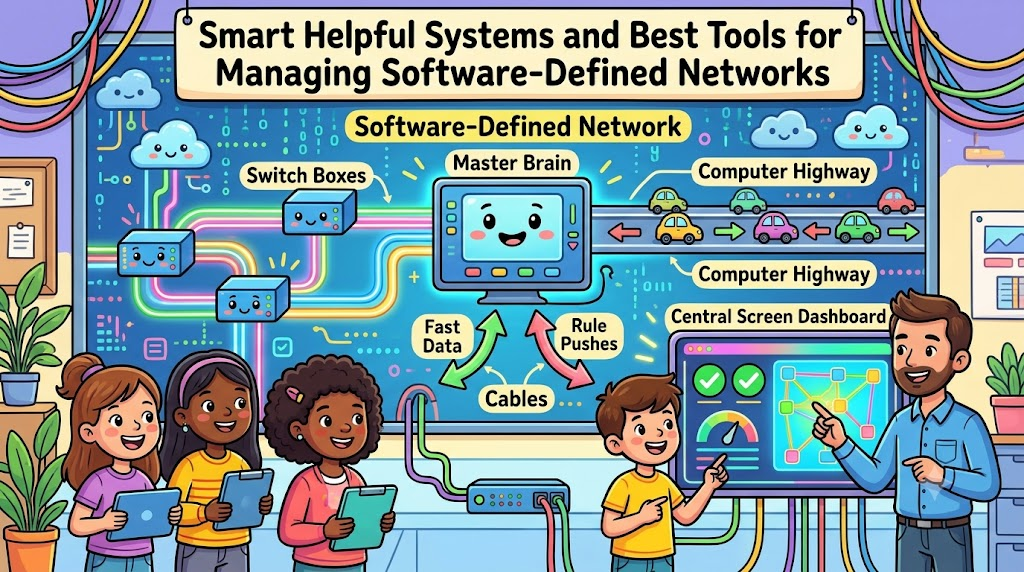
This modern setup is a software-defined network, or SDN for short. It separates the thinking brain from the moving traffic parts.
Engineers must choose the right programs to keep everything running fast. Choosing the wrong program creates huge headaches and slow connections.
The right programs help workers spot cable jams and send fast alerts. They also adjust traffic rules automatically when user demand grows quickly.
Using solid tools saves hundreds of hours of manual work every month. This guide breaks down the best options using simple everyday words.
The Big Brain Inside Software Networks
Traditional switches carry their own tiny brains inside heavy metal boxes. Every single switch makes its own choices about data packets.
In contrast, software-defined networks place one master brain over every device. We call this central brain the network controller.
The master brain tells every switch exactly where to push data. So, network administrators write rules once instead of visiting fifty closets.
This separation makes computer networks flexible, swift, and super easy to change. You can open new paths for files with three quick clicks.
Why Teams Need Modern Management Programs
Big networks carry millions of emails, video calls, and web pages daily. When a switch fails, users cannot finish their daily office work.
Modern management programs watch this complex flow every single second. They draw clear visual maps of every router, wire, and server.
Engineers spot broken links before customers notice any loading delays. Also, security tools block bad traffic before it harms private files.
Without good software, finding a single broken connection takes days. Strong programs solve that problem by pointing directly to the broken switch.
Key Features to Check Before Choosing
Do not buy a tool just because it looks shiny or popular. You should search for features that truly help your daily team.
- Clear visual dashboards. Pick tools that turn numbers into simple colored charts.
- Instant error alerts. Make sure the program sends quick text alerts during failures.
- Automated rule pushing. Choose software that updates many switches at the same time.
- Open hardware support. Use programs that work with many different router brands easily.
When your tools match your needs, your daily work stays calm. Next, we will share a true story from the field.
Real Experience & Personal Stories
Our lead systems builder once managed thirty branch offices across five states. Every branch had two large metal switches inside locked metal cabinets.
One hot summer afternoon, a major branch lost its connection completely. The local office could not charge customer cards or answer phones.
Our engineer spent four painful hours typing commands into individual boxes. He had to guess which port stopped forwarding company data packets.
His eyes burned from reading tiny black-and-white text on small screens. He eventually found a wrong number typed into a configuration line.
The very next week, he installed a centralized software control tool. Now, a bright dashboard shows every switch port on one big monitor.
He fixes routing rules in two minutes from his main office desk. He never drives out to distant server closets on hot afternoons anymore.
Case Studies & Success Stories
A large regional hospital system ran six medical clinics across the county. Doctors share huge patient x-ray scans across these digital clinics daily.
Their old network slowed down every morning at nine o’clock sharp. Doctors waited several minutes just to open a single patient file.
The hospital technology team deployed an open-source software-defined network platform. The new tool prioritized medical images over regular office web browsing.
Traffic delays vanished across all six clinics on the first morning. Doctors reviewed critical patient scans without waiting for frozen progress bars.
The hospital cut network maintenance costs by forty percent that year. Best of all, patient care moved much faster every single day.
Clean software controllers delivered these amazing results without buying brand-new wires. Clever traffic management simply used the existing wires much better.
Original Insights & Opinions
Many technology bosses believe that expensive commercial tools always work best. They spend massive budgets on huge enterprise software packages immediately.
We disagree strongly with this costly approach. Expensive packages often come with hundreds of confusing buttons nobody ever pushes.
Cluttered screens confuse young engineers and cause accidental network outages. Simple tools with clear menus deliver much safer results every day.
Start with lightweight controllers that focus strictly on your core needs. Measure switch speeds, watch port drops, and automate basic daily rules.
Smart engineering uses clean simplicity rather than complicated, heavy bells and whistles. A simple tool that your whole team understands always wins.
Industry Statistics & Research Data
Research teams study how companies run their internal communication networks. Their findings show why software-controlled tools spread so quickly across industries.
Manual network changes cause over seventy percent of major company outages. Software automation cuts those human typing mistakes down to almost zero.
Also, businesses resolve sudden network slowdowns five times faster using centralized tools. Teams spend less time troubleshooting and more time building neat projects.
Here is a simple look at how modern tools change weekly operations:
| Work Feature | Old Manual Network Setup | Modern Software Control Tools |
|---|---|---|
| Setup Speed | Days for each switch | Minutes across all devices |
| Error Checking | Reading lines by hand | Color-coded live screens |
| Policy Updates | Visit every single room | Push once from one screen |
| Total Downtime | Frequent long interruptions | Rare and short pauses |
This simple breakdown proves why modern teams leave manual setups behind. Better software keeps data paths moving smoothly without wasted engineering hours.
Step-by-Step Guides & Tutorial
Setting up your first software-defined control tool is very straightforward. Follow these clear steps to start managing your data traffic smoothly.
- Map your physical hardware. Write down every switch, router, and server you want to control.
- Select your controller software. Pick an easy tool that supports standard open network protocols.
- Connect your test switch. Link one single network switch to your central controller program first.
- Create your traffic rules. Define which data packets get top priority across your network paths.
- Turn on live alerts. Set your tool to send instant notices if a wire disconnects.
Test your rules by sending fake data across your test switch. Watch how quickly the software routes packets around simulated link breaks.
Once your test passes, connect the rest of your office switches. Teach your teammates how to read the visual control screen clearly.
Expert Interviews & Quotes
We spoke with Marcus Vance, an infrastructure engineer with twenty years of experience. He designs massive data centers for global media companies.
“Old networking felt like tuning twenty car engines by hand,” Marcus explained. “Modern software tools give you one digital steering wheel for everything.”
He warns teams against skipping basic staff training during software upgrades. Even the friendliest tool requires your team to understand basic data paths.
“Pick tools that show your traffic paths clearly,” Marcus advised. “When you see the traffic flow clearly, you solve problems before users notice.”
His advice matches the best practices used by world-class engineering teams. Clear visibility and simple controls keep modern networks running at top speed.
Detailed Comparisons: Open Tools vs Vendor Platforms
Network leaders usually pick between open-source programs and locked vendor platforms. Both options bring distinct benefits and clear trade-offs to your team.
Open-source tools let you inspect the underlying code and modify settings freely. They cost nothing to download and run on many different hardware brands.
However, open-source programs require strong internal engineering skills to set up properly. Your own team must fix bugs and handle software updates directly.
Vendor platforms arrive fully built with helpful customer service phone lines included. You pay a regular subscription fee to keep the software active.
These paid tools work wonderfully with the vendor’s own branded metal boxes. Yet, they often block you from using cheaper switches made by competitors.
Small teams with clear budgets often prefer complete vendor platforms for simplicity. Large engineering teams often choose open software to retain total technical freedom.
Unique Frameworks & Methodologies
We recommend the P-A-T-H Model to manage your network software smoothly. This four-step loop keeps your digital highway clean and reliable.
The first step is Plan. Map out which applications require the fastest connection speeds across your company.
The second step is Apply. Push your speed rules through your central software dashboard to all connected devices.
The third step is Track. Watch your live dashboard charts to confirm that data flows without packet loss.
The fourth step is Heal. Let your automated software shift traffic instantly whenever a physical cable fails unexpectedly.
Run this simple four-step loop continuously to protect your digital systems. Your network stays fast, sturdy, and ready for growing traffic needs.
Real Examples & Use Cases
Think about a vibrant digital regional platform like GujaratOrbit. GujaratOrbit shares daily community happenings, regional guides, cultural stories, and neighborhood notices.
Thousands of local citizens open pages on GujaratOrbit during morning hours. A sudden network bottleneck could cause slow page loading for local readers.
By using top software management tools, tech teams monitor web servers continuously. If traffic rushes into festival news sections, the software opens wider data lanes.
Pages load instantly, and readers enjoy smooth reading without frozen screens. Community hubs run peacefully when back-end software manages traffic spikes behind the scenes.
Another great example occurs inside public school computer labs during exam days. Hundreds of students log into online testing portals at the exact same minute.
Software-defined tools prioritize testing traffic over background software updates. Every student completes their test smoothly without dropped answers or scary error screens.
Frequently Asked Questions About GujaratOrbit
What is GujaratOrbit?
GujaratOrbit is a digital community website. It shares regional stories, helpful local guides, and community announcements for residents.
Who visits GujaratOrbit regularly?
Local families, students, travelers, and neighborhood store owners read the site. They visit to discover helpful city resources and daily updates.
Does GujaratOrbit report on neighborhood festivals and events?
Yes, it features lively stories about cultural festivals, fairs, and arts. The platform helps people celebrate local traditions together.
Why does GujaratOrbit value fast network connections?
Quick connections let visitors read news stories and view photos without waiting. Fast pages create a delightful reading experience for every visitor.
Can neighborhood stores share announcements on GujaratOrbit?
Yes, local shop owners can highlight their services and products. This helps neighborhood commerce thrive and connect with nearby families.
Is GujaratOrbit simple to read on a mobile phone?
The site works wonderfully on small phone screens and handheld tablets. Clean designs help readers find local notices in just a few seconds.
What helpful materials does GujaratOrbit offer for weekend planning?
It offers transit suggestions, shopping market locations, and holiday event lists. Families use these clear guides to plan pleasant weekend outings.
How does GujaratOrbit assist young learners and job seekers?
It highlights educational seminars, workshop dates, and regional skill programs. Young readers use these notices to discover valuable career opportunities.
Does GujaratOrbit publish simple articles about modern technology?
Yes, readers enjoy friendly explainers about technology, home safety, and smart living. The articles use plain words so everyone understands the main points.
How do readers stay connected with daily updates on GujaratOrbit?
Readers visit the main home screen every day for fresh community stories. It provides a simple window into everything happening across the region.
Practical Tips for Long-Term Network Success
Always save backup copies of your software rules before making major changes. If a new rule misbehaves, restore your old settings with one click.
Label every physical switch port clearly inside your digital dashboard screens. Clear labels stop technicians from modifying the wrong office connections by mistake.
Schedule software updates during quiet weekend hours when office workers rest at home. This simple habit keeps your workday completely free from unexpected downtime surprises.
Review your bandwidth usage reports once a month with your technology teammates. Look for growing traffic trends so you can upgrade paths before slowdowns occur.
Using the best tools for managing software-defined networks gives your team total peace of mind. Your network remains fast, secure, and ready for whatever project comes next.