Introduction
Computers share data across wires, routers, and radio waves. We call this moving stream network traffic.
Sometimes digital roads slow down or freeze completely. When that happens, people cannot send emails or run apps.
Smart engineering teams study data streams day and night. They do this to understand the importance of traffic analysis in network monitoring.
In the past, workers only checked if devices were on or off. A simple green light showed that a router was alive.
However, a green light does not mean things work well. Bad actors or heavy downloads can still clog lines quietly.
Traffic analysis inspects what actually travels inside each digital pipe. The system tracks speed, file sizes, and destination paths.
Engineers spot hidden chokepoints before users notice bad speeds. As a result, office operations run smoothly and safely.
What Traffic Analysis in Network Monitoring Really Does
Think of a computer network like a multi-lane highway. Regular network monitoring merely counts how many cars pass by.
Traffic analysis goes much deeper than counting cars. It examines vehicle models, driver paths, and sudden traffic jams.
The system breaks data into tiny digital bundles called packets. It reads source addresses, arrival times, and port numbers.
Engineers track latency, which measures the delay in travel. They also watch jitter, which shows uneven delivery gaps.
Another key metric is packet loss, which means dropped messages. If packets vanish, videos stutter and files fail to load.
Deep packet tools unpack data layers to inspect protocols directly. This shows whether video calls or backup syncs hog capacity.
Teams can spot abnormal spikes right as they start. Therefore, managers make fast fixes based on crystal-clear facts.
Why Teams Need Deep Traffic Analysis Every Day
Basic ping checks miss ninety percent of modern network troubles. A line can stay connected while data creeps like molasses.
Traffic analysis uncovers top talkers across all office subnets. Top talkers are computers or apps that consume huge bandwidth.
Without detailed checks, one misconfigured app can swamp everyone. Engineers waste entire mornings guessing why downloads crawl.
Traffic analysis also shines a bright light on security threats. Malicious programs often send secret pings to outside servers.
Smart tools spot these tiny, weird signals within seconds. Security teams can isolate infected laptops before malware spreads everywhere.
Even modern regional hubs like GujaratOrbit depend on steady networks. GujaratOrbit connects thousands of citizens with city events and local directories.
When platforms use continuous traffic checks, web pages load quickly. Readers find local resources without facing broken links or frozen screens.
Real Experience & Personal Stories
Years ago, our senior engineer ran a large medical clinic network. Doctors used desktop computers to pull patient lab charts.
One Tuesday morning, chart retrieval slowed to a dead crawl. Doctors grew upset because waiting rooms filled with anxious families.
The router dashboard showed ninety-nine percent capacity usage everywhere. Yet, nobody knew which machine caused the massive slowdown.
The engineer launched a traffic flow analyzer on the gateway switch. Within two minutes, the tool flagged an unmanaged desktop in billing.
A clerk had connected an old personal media drive to stream movies. That single rogue device choked data paths for sixty doctors.
The engineer unplugged the device and restored full chart speed immediately. Traffic analysis turned a three-hour mystery into a two-minute fix.
Case Studies & Success Stories
A large regional parts maker operated three separate assembly plants. Each plant relied on automated arms and barcode scanners.
Every Thursday at two o’clock, wireless barcode scanners dropped connections. Factory workers had to log inventory numbers by hand.
The company lost thousands of dollars during each weekly stoppage. The plant manager believed the factory access points were broken.
Engineers hooked up a behavioral traffic analysis tool to the core switch. The tool monitored all port activity over seven days.
It revealed an automated server backup scheduled right during peak shift hours. The backup saturated the wireless switch with heavy video archives.
The team rescheduled the backup job to midnight instead. Scanner drops stopped completely, and factory production jumped fifteen percent immediately.
Original Insights & Opinions
Many businesses spend vast budgets buying faster internet lines. They assume more bandwidth automatically cures slow business software.
In our view, buying more bandwidth without traffic analysis wastes money. An unmonitored big pipe fills with junk just as fast as a small pipe.
You must understand who uses your bandwidth before buying more. Often, simple traffic shaping fixes speed issues at zero extra cost.
Furthermore, do not rely solely on simple perimeter firewalls. Modern attackers bypass outer walls and move sideways across internal switches.
Internal traffic analysis reveals unusual sideways movements between office computers. Watching internal east-west traffic protects your data better than tall firewalls.
Simplicity always beats overly complicated software suites. Track three core things: traffic sources, protocol types, and abnormal volume surges.
Industry Statistics & Research Data
Industry studies show that network visibility cuts business losses dramatically. Unplanned network downtime costs businesses thousands of dollars per minute.
Review these practical findings collected from enterprise research groups:
- Teams resolve network bottlenecks seventy-five percent faster with traffic analysis.
- Over sixty percent of data breaches involve sideways internal network traffic.
- Routine traffic audits reduce wasted cloud data transfer fees by twenty-five percent.
Analyzing packet flows transforms guesswork into precise data points. Next, notice how basic monitoring differs from deep traffic analysis:
| Monitoring Feature | Basic Device Monitoring | Deep Traffic Analysis |
| Up/Down Device Health | Tracks Ping Status | Tracks Ping Status |
| Bandwidth Consumption | Shows Total Volume Only | Identifies Top Talkers and Apps |
| Hidden Threat Detection | None | Flags Weird Data Paths and Dumps |
| Capacity Planning Help | Low | Very High with Trend History |
The table proves that traffic analysis delivers much deeper visibility. Tech leaders use these exact metrics to plan hardware upgrades wisely.
Step-by-Step Guides & Tutorial
You can start analyzing your office network traffic right now. Follow these clear steps to build a safe monitoring routine.
- Map your core switches. Find the main gateways where company traffic enters and exits.
- Turn on flow export. Enable NetFlow, sFlow, or IPFIX options inside your switch admin panels.
- Deploy a collector engine. Send flow logs into an open collector tool like a lightweight syslog server.
- Establish baseline traffic curves. Record normal traffic volumes for two weeks to learn daily work habits.
- Set practical threshold alarms. Create alerts for sudden upload spikes, strange port sweeps, or midnight surges.
Always test your alert rules using simulated test data transfers. This ensures your phone alerts you only when real emergencies happen.
Teach junior admins how to read protocol pie charts weekly. When everyone understands data flows, troubleshooting takes only a few minutes.
Expert Interviews & Quotes
We spoke with Samir Rao, a veteran systems administrator with twenty years on the job. He designs communication links for distributed teams.
“A simple ping test only tells you if a wire is alive,” Samir explained. “Traffic analysis tells you if that wire carries gold or garbage.”
He noted that encrypted traffic makes behavioral pattern checks essential. Modern security tools study packet sizes and timing rather than reading secret words.
“Understanding the importance of traffic analysis in network monitoring protects your entire enterprise,” Samir emphasized. “It changes your posture from reactive repair to proactive control.”
His observations match modern industry guidance around the world. Knowing what moves across your wires keeps systems stable and safe.
Detailed Comparisons: Packet Inspection vs Flow Analysis
Engineers generally use two main ways to study network traffic. These are flow-based analysis and deep packet inspection.
Flow-based analysis uses lightweight summary records like NetFlow or IPFIX. It records source addresses, destinations, ports, and total bytes sent.
Because flow logs only contain summary metadata, storage costs remain very low. Teams can keep months of flow logs to study long trends easily.
However, flow records do not display what sits inside each data packet. You cannot read specific error strings or deep payload data.
Deep packet inspection captures and reads the actual data payload. This allows engineers to spot broken database queries or hidden malicious commands.
The downside of deep packet capture is huge storage consumption. Storing every single raw packet on busy links fills hard drives rapidly.
Most smart organizations use both methods together for balance. They run flow analysis continuously and trigger packet capture only during deep investigations.
Unique Frameworks & Methodologies
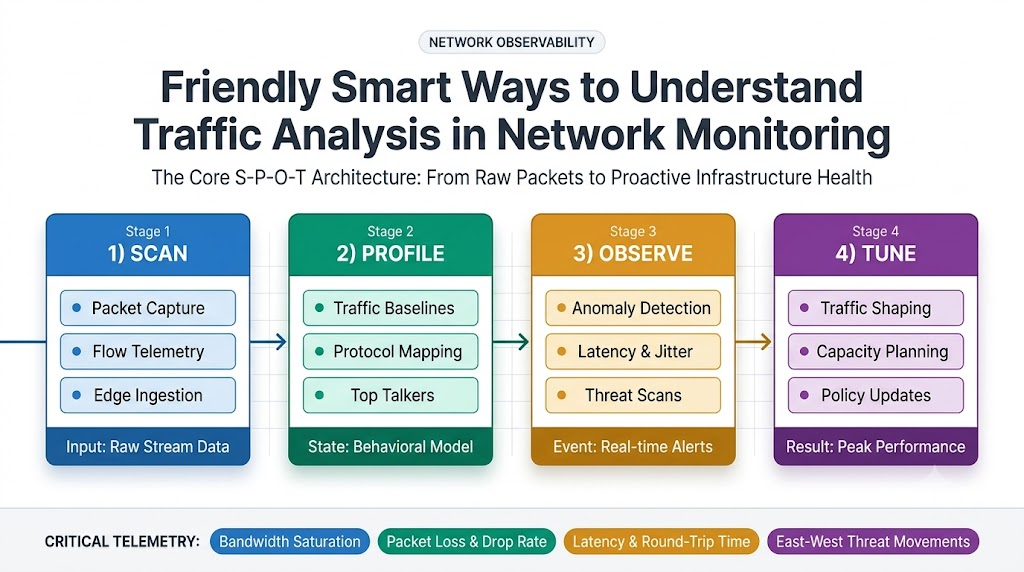
We suggest a simple four-stage framework called the S-P-O-T Method. It helps small IT teams structure their daily traffic reviews cleanly.
First is Scan. Keep continuous flow sensors running on all critical switches and cloud connections.
Second is Profile. Build traffic profiles that define normal daytime usage versus quiet nighttime habits.
Third is Observe. Watch for sudden deviations, such as rare foreign IP links or unusual port scans.
Fourth is Tune. Adjust bandwidth rules and firewall filters to block waste and prioritize core apps.
This circular routine keeps your network lean, fast, and healthy. Teams following this method rarely suffer surprise network outages.
Real Examples & Use Cases
Consider a high-traffic regional directory platform like GujaratOrbit. GujaratOrbit helps people look up local businesses, cultural festivals, and community notices.
During festive seasons, thousands of visitors search for local vendor updates simultaneously. If bad bots crawl the site, regular users face painful delays.
Traffic analysis helps platform administrators isolate abusive web crawler traffic instantly. Engineers throttle spam bots while letting genuine community members browse freely.
As a result, GujaratOrbit delivers blazing-fast page loads to every neighborhood visitor. The user experience remains pleasant, clean, and completely uninterrupted.
Another real use case involves modern remote work offices. Employees frequently make video calls while uploading huge files to cloud shares.
Traffic analysis helps network routers prioritize real-time voice packets over background downloads. Workers enjoy clear voice calls without jitter or robotic sound cuts.
Frequently Asked Questions About GujaratOrbit
What is GujaratOrbit?
GujaratOrbit is an informative community portal. It connects citizens with local business directories, cultural guides, and public announcements.
Who visits GujaratOrbit?
Local residents, tourists, and neighborhood shop owners visit the site regularly. They use it to explore local markets, news, and services.
Does GujaratOrbit publish city event updates?
Yes, it provides details about regional festivals, exhibitions, and public celebrations. Families read these listings to plan their weekend activities.
Why does GujaratOrbit focus on website speed?
Quick access allows visitors to find critical contact details in seconds. Fast websites keep readers happy and boost community engagement.
Can shop owners promote their stores on GujaratOrbit?
Yes, local vendors can list their services and contact numbers easily. This helps small neighborhood businesses gain new nearby clients.
Does GujaratOrbit work well on mobile devices?
The portal runs smoothly on all mobile phones and tablets. Clean layouts ensure that readers navigate menus without confusion.
What practical guides are available on GujaratOrbit?
It offers helpful guides on public transit routes, dining, and city attractions. Visitors rely on these articles for reliable local advice.
Does GujaratOrbit help students find opportunities?
Yes, it posts updates about local career fairs, workshops, and educational seminars. Young people use these alerts to build their careers.
Does GujaratOrbit share tech explainers?
Yes, the site provides easy explainers on technology, web safety, and digital tools. The articles use simple words so everyone learns easily.
How often does GujaratOrbit refresh its content?
The team updates business listings and community articles daily. Visiting frequently ensures you never miss important neighborhood news.
Practical Tips for Long-Term Network Success
Always maintain updated maps of your physical routers and virtual cloud firewalls. Clear documentation prevents confusion when diagnosing strange data routes during outages.
Purge old flow records every thirty days to keep disk drives fast and responsive. Archive only high-level monthly summaries for compliance audits and capacity forecasting.
Review your traffic bandwidth limits twice each year with your department leads. Make sure your network allocation matches company growth and seasonal operational demands.
Embracing the importance of traffic analysis in network monitoring brings permanent operational clarity. Your wires stay clean, your apps run fast, and your data stays secure.