Every day, billions of computers talk to each other across the world. They send messages, videos, and game data through long cables and air waves.
Sometimes, these digital paths get clogged or break down. When that happens, your favorite apps freeze up or stop working completely.
Smart engineers use special software tools to watch these systems every second. You can learn how to build and watch fast systems at Noopsschool.
These tools act like doctors for computers. They spot trouble early so people can fix issues before you notice any lag.
What Is Network Monitoring?
Network monitoring means checking on computer systems all day and night. The software watches data travel across cables and Wi-Fi paths.
It checks if routers and servers stay healthy. A router is a small computer that directs traffic. A server is a computer that holds websites and games.
If a machine gets too hot or stops, the tool sends a loud warning. Next, the engineer steps in to fix it right away.
Why Network Health Matters
A healthy network works quietly in the background. Websites pop up on your screen in a split second.
Online games run smoothly without jerky jumps. Video calls look sharp and voice chats sound crystal clear.
When networks get sick, data packets get lost in traffic. This loss causes annoying delays and broken connections. Good monitoring tools stop these headaches before they start.
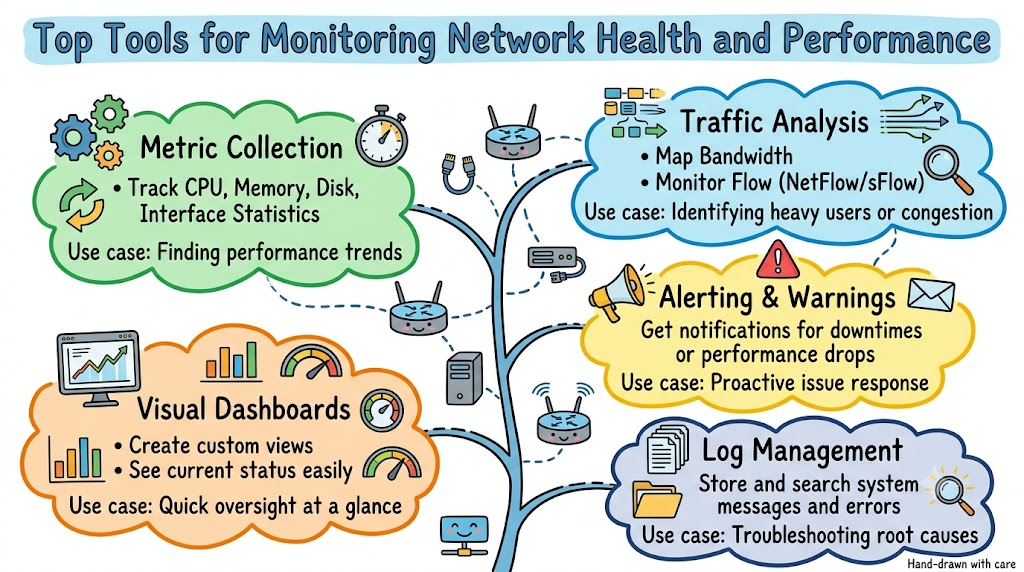
Top Tools You Can Use Today
Engineers use several great tools to check system health. Each tool has a special job that it does best.
- Zabbix tracks thousands of servers and routers for free.
- PRTG Network Monitor uses easy visual sensors to check traffic.
- Datadog watches cloud apps and spots speed drops quickly.
- Prometheus and Grafana collect numbers and turn them into pretty charts.
- Nagios sends quick alerts when any machine goes offline.
Each of these helpers makes sure the internet stays fast and dependable for everyone.
Key Operational Concepts You Must Know
To keep systems running, you must understand a few basic ideas. Computer systems send tiny bits of data called packets.
First, you must check uptime. Uptime means the total time a computer stays on and works properly.
Next, you need to track packet loss. This happens when wires drop data boxes along the way. Dropped boxes force computers to send the data all over again.
| Metric | What It Means | Why It Matters |
|---|---|---|
| Uptime | Time a server stays online | Keeps websites open to users |
| Latency | Speed of a single data trip | Stops games from freezing |
| Packet Loss | Dropped data boxes | Prevents broken video calls |
| Throughput | Real data moved per second | Fills downloads quickly |
You must also check jitter. Jitter means that data packets arrive with messy, uneven timing. Uneven timing makes songs stutter and voices sound robotic.
Platform Implementation vs. Culture — What’s the Real Difference?
Keeping networks fast takes great tools and great team habits. Many teams make the mistake of buying tools without building good habits.
The tool side is the platform. This includes dashboards, alert bots, and monitoring software. These tools gather numbers and display charts on big screens.
The human side is culture. Culture means how people work together every single day. A great team reacts quickly when an alarm rings.
How Different Roles Use Tools
- Network Helpers
- Platform: Set up software to trace cables and routers.
- Culture: Check system graphs every morning before work starts.
- Code Writers
- Platform: Build tools that test software speed automatically.
- Culture: Fix slow code before sharing it with real users.
- Team Leads
- Platform: Buy high-grade monitoring software for the company.
- Culture: Praise team members who find and solve slow spots early.
Real-World Use Cases of Modern Operations
Let us see how monitoring tools save the day in real life.
Think about a busy online store during a big sale. Millions of shoppers click buttons at the exact same minute.
Monitoring software watches the shopping traffic live. If a server starts to slow down, the tool alerts the team immediately.
The engineers add more server power right away. Because of this quick fix, shoppers buy their items without a hitch.
Next, look at large hospital networks. Doctors send digital scans across building floors to help sick patients.
If a hospital cable fails, monitoring software spots the break instantly. The system redirects the scan along a backup cable. This quick switch keeps patients safe.
Common Mistakes in Operations Engineering
Even smart engineers make mistakes when they set up monitoring tools.
One big mistake is creating too many loud alerts. If alarms buzz every five minutes, engineers get tired and ignore them.
Smart teams only set alarms for real emergencies. That way, people pay close attention when a true problem happens.
Another mistake is only watching the main server room. Home users connect from miles away through local telephone lines.
If you ignore the user’s path, you will miss local traffic jams. You must test the connection all the way to the user’s home screen.
Lastly, some teams forget to save old data. Old numbers show you how traffic grows over time. Saving old reports helps you plan for future upgrades.
How to Become an Operations Expert — Career Roadmap
You can turn network monitoring into an exciting, high-paying career. It takes steady practice, but you can begin right at home!
Start by studying how home Wi-Fi and cables work. Plug a cable into your home router and run speed tests.
Next, install free monitoring tools on an old laptop. Watch how much memory and network traffic your home computer uses.
| Step | What to Learn | What to Practice |
|---|---|---|
| Step 1 | Internet basics | Check ping and data loss at home |
| Step 2 | Free tools | Set up Zabbix or PRTG on a home PC |
| Step 3 | Cloud systems | Build dashboards with Prometheus and Grafana |
Soon, you can learn cloud systems. Cloud systems run on giant server farms across the planet. Learning these tools helps you run the biggest networks in the world.
FAQ Section
- What is the simplest tool for beginners to try?PRTG Network Monitor is very easy for beginners.It gives you free sensors and has clean, colorful visual charts.
- Why do servers crash without warning?Servers crash when too many people visit at once.They also fail when fans stop spinning and computer parts overheat.
- How do monitoring tools know a computer is down?The tool sends a tiny test packet every few seconds.If the server does not reply quickly, the tool sounds an alarm.
- Is free monitoring software good enough for real companies?Yes, many world-class companies use free open-source software like Zabbix.These free tools work great if your team knows how to set them up.
- What is a monitoring dashboard?A dashboard is a single computer screen filled with graphs.It shows speeds, temperatures, and alerts all in one handy place.
Final Summary
Network monitoring tools protect our digital world from sudden crashes and frustrating delays. They track critical metrics like uptime, speed, and packet loss every single second. By choosing reliable tools like Zabbix, PRTG, and Datadog, teams catch problems long before users notice them.
Great tools alone are not enough to guarantee success. Teams must also build healthy work habits and react quickly to alerts. When engineers pair smart software with daily care, networks stay fast, reliable, and strong.