Imagine you mail ten postcards to your best friend. But your friend receives only eight of them.
Two postcards vanished somewhere along the highway. That missing mail is what tech experts call packet loss.
When this happens on the internet, your video freezes. Your online games stop moving. You can learn how to fix these network troubles at Noopsschool.
What Is a Data Packet?
Computers do not send giant files all at once. Instead, they slice every song, photo, and game into tiny pieces.
We call these tiny digital slices packets. Each packet travels across wires like a tiny envelope with an address.
When all packets arrive safely, your computer glues them back together. But if packets vanish on the trip, your screen stutters and pauses.
Why Does Packet Loss Happen?
Packet loss happens when digital traffic jams block the road. A busy router gets flooded with too much data at once.
Because the router runs out of room, it tosses extra packets into the trash. That is called router congestion.
Faulty wires and bent cables also drop packets. Weak Wi-Fi signals through thick walls cause missing data too.
Key Operational Concepts You Must Know
To keep your connection strong, you must know a few core ideas. Three main metrics show the overall health of your network.
The first metric is packet loss. This tells you the percentage of data packets that never reached their final stop.
The second metric is latency. Latency is the round-trip travel time for your data.
The third metric is jitter. Jitter measures how uneven your packet arrival times are.
| Term | What It Means | Why It Matters |
|---|---|---|
| Packet Loss | Missing pieces of data | Freezes videos and disconnects games |
| Latency | Travel delay | Causes slow response times |
| Jitter | Bumpy arrival speed | Makes voice calls sound robotic |
The Two Delivery Rules
Computers use two main rule sets to send packets. The first rule set is TCP.
TCP tracks every packet like a registered parcel. If a packet goes missing, your computer asks for a new copy right away.
The second rule set is UDP. UDP does not check for lost packets. It drops lost pieces and keeps moving without waiting.
Spotting Silent Network Trouble
Sometimes networks hide packet loss very well. TCP resends missing packets so fast that files still open correctly.
However, each resend wastes precious time. That hidden delay makes your website load feel sluggish and sticky.
Testing with simple ping commands reveals these hidden drops. You can see the exact percentage of lost packets in seconds.
Platform Implementation vs. Culture — What’s the Real Difference?
Fixing lost data needs smart tools and strong team habits. You cannot solve network drops with only one of them.
The tool side is the platform. This means using quality routers, fiber cables, and active monitoring software.
The human side is the culture. Culture means teaching workers to check cable health and test speeds regularly.
How Teams Collaborate to Stop Packet Drops
- Help Desk Staff
- Platform: Run ping tests from the user laptop right away.
- Culture: Listen patiently and log every user complaint carefully.
- Network Administrators
- Platform: Replace worn cables and update router software patches.
- Culture: Review error logs every single morning without skipping.
- System Architects
- Platform: Build backup paths so traffic routes around broken wires.
- Culture: Test backup links monthly to ensure they work smoothly.
Real-World Use Cases of Modern Operations
Let us see how real teams track down and stop packet loss.
First, imagine a busy call center with hundreds of staff. Callers complain that agent voices cut out every few seconds.
The network team checks the main switch. They find an old network cable bent under a heavy metal desk.
Replacing that five-dollar cable stops the packet drops instantly. All client phone calls turn clear and smooth again.
Keeping Online Games Fast and Fair
Next, look at large competitive video games. Players need every jump and shot to register without any delay.
A game server that drops two percent of packets ruins the whole match. Characters warp across the screen, and players get upset.
Engineers solve this by renting dedicated game servers close to big cities. Shorter paths mean fewer routers and way fewer dropped packets.
Streaming Big Live Events
Finally, consider a live sports broadcast streaming over the web. Millions of fans watch the game at the exact same moment.
If the main feed drops packets, the video screen turns into blurry colored blocks. Viewers miss the winning goal.
Broadcasters use multiple internet links at the same time. If one link drops packets, the stream shifts data to the second link instantly.
Common Mistakes in Operations Engineering
Many engineers make easy mistakes when chasing down packet loss.
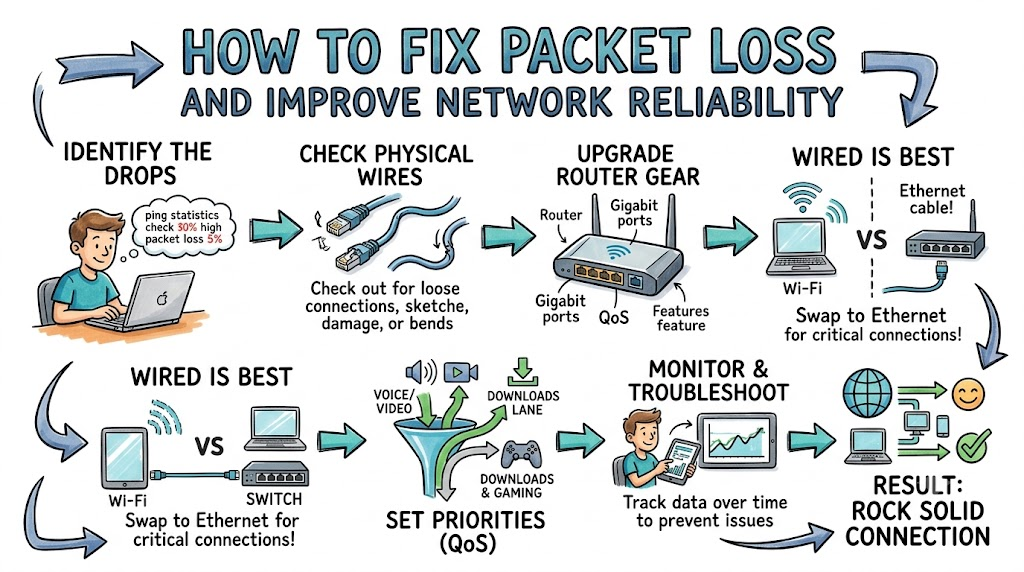
The biggest mistake is blaming the internet provider first. In many cases, the real culprit is a loose cable inside your own room.
Always test your local gear before calling for outside help. Unplug your router and check your cords first.
Overloading Wi-Fi Channels
Another mistake is running too many wireless gadgets on one Wi-Fi box. Smart lights, TVs, and phones all fight for the same radio waves.
This radio crowd causes invisible collisions in the air. When signals collide, packets break apart and vanish.
Switch your critical work computer to a direct wired cable. A physical wire shields your data from wireless radio noise.
Ignoring Hardware Heat
Many people hide routers inside tight, dusty cabinets. Routers are small computers that get very hot under heavy loads.
When a router overheats, its computer brain starts making mistakes. It drops packets simply because it cannot think straight.
Keep your network gear out in the open air. Clean off dust so cool air flows freely around the vents.
How to Become an Operations Expert — Career Roadmap
You can turn network repair skills into a rewarding career. Every company needs people who keep internet systems running.
Start by practicing basic network commands on your own computer. Use tools like ping and traceroute to see how data jumps between towns.
Next, learn how network switches prioritize traffic using quality rules. You can build small test labs using free virtual tools.
Steps to Master Network Reliability
| Step | Core Skill | Practical Goal |
|---|---|---|
| Stage 1 | Cable and Wi-Fi testing | Find bad cords and clear radio channels |
| Stage 2 | Traffic monitoring tools | Graph packet drops on local switches |
| Stage 3 | Redundant path routing | Set up automatic backup connections |
Once you master the basics, study advanced routing rules like BGP. Learn how large cloud networks route traffic around undersea cable cuts.
Hands-on practice will turn you into a trusted network specialist. Great network doctors never lack exciting job opportunities.
FAQ Section
- What is an acceptable level of packet loss?For normal web browsing, packet loss should stay below one percent.For gaming and live video calls, zero percent packet loss is the goal.
- Can a bad Ethernet cable cause packet loss?Yes, cracked wires and bent pins inside a cable drop signals easily.Swapping out an old cable often fixes mysterious packet drops immediately.
- Does Wi-Fi drop more packets than a wired cable?Yes, Wi-Fi sends data through open air where objects cause interference.Physical walls, microwave ovens, and neighbor networks can scramble your wireless packets.
- How do I test my computer for packet loss?Open your terminal and run a continuous ping test to a reliable server.The test summary will show the exact percentage of packets that failed to return.
- Does buying more internet speed stop packet loss?No, buying higher speed only makes your data pipe wider.If the pipe has a leak or a broken router along the path, packets will still vanish.
Final Summary
Packet loss happens when digital envelopes vanish along their journey across the network. These missing pieces cause choppy video calls, frozen games, and sluggish websites. Most packet drops stem from traffic jams, bad cables, or crowded Wi-Fi channels.
You can fix most issues by checking physical cords and using direct wired connections. Keep your routers cool and monitor your lines with simple ping tests. When you clean up the road for your data packets, your network runs fast and reliably every day.