Introduction
Computer networks carry messages across offices, cities, and countries every second. Companies need fast, safe wires to keep their daily work moving smoothly.
Today, leaders face a big choice between NFV vs. Traditional Networking: Pros and Cons. Both paths move data, yet they work in very different ways.
Old networks use heavy metal boxes for every single job. New networks use smart software programs running on regular servers instead.
Understanding these two options helps teams save money and work faster. Let us explore how each network style affects your business.
Understanding Traditional Networking Basics
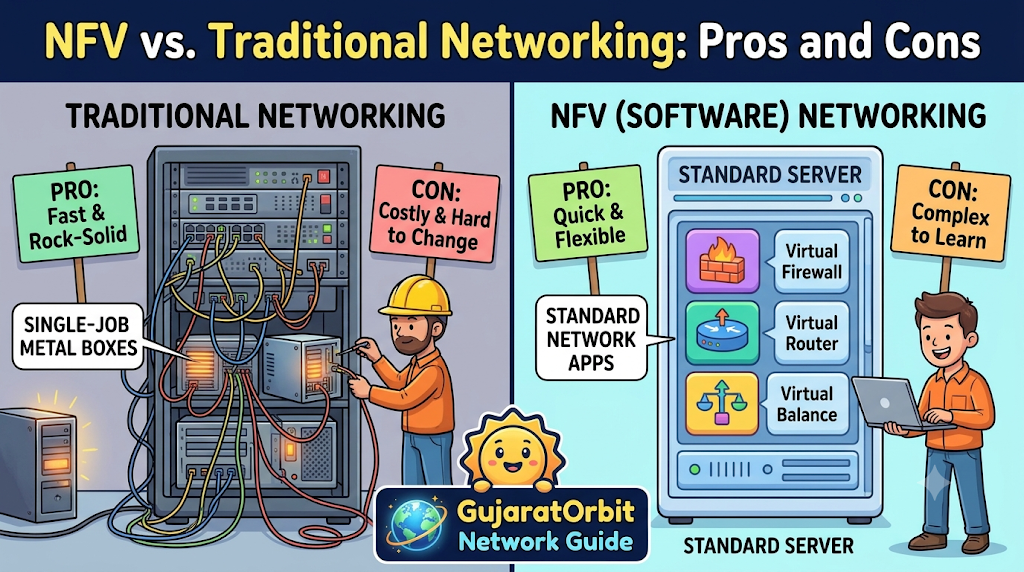
Traditional networking relies on dedicated hardware boxes. Each metal box handles one specific job inside a server room.
For example, one box acts as a firewall to block bad traffic. Another box acts as a router to guide data packets safely.
Engineers must plug in cables and set up each box by hand. Because these boxes are physical, changing them takes lots of effort.
If your company grows, you must buy and ship more boxes. This slow process often holds back fast-moving teams.
Exploring NFV Software Power
NFV stands for Network Functions Virtualization. In plain words, it replaces single-purpose metal boxes with smart software apps.
Instead of buying ten separate boxes, you buy standard computer servers. Then, you run virtual network tools right inside those servers.
A software firewall and a software router can share one machine. Engineers launch new tools with just a few mouse clicks.
Because software moves easily, teams can grow their networks in minutes. This flexible setup makes modern cloud work much simpler.
Core Pros and Cons of Traditional Hardware
Traditional networks offer rock-solid speed for heavy data tasks. Vendors build custom chips inside each box to push packets fast.
Many older engineers know these physical boxes inside and out. Thus, troubleshooting familiar wires feels comfortable for veteran staff.
However, traditional hardware carries heavy drawbacks for growing firms.
- High upfront costs: Custom metal boxes cost lots of money to buy.
- Slow upgrades: Shipping and wiring new hardware takes weeks of waiting.
- Vendor lock-in: One brand’s box rarely talks easily to another brand’s gear.
- Wasted power: Half-empty server racks still burn electricity day and night.
Key Pros and Cons of Virtual Networks
Virtual networks shine when businesses need speed and flexibility. You can spin up new security rules across global offices instantly.
Software updates patch bugs without anyone visiting a cold server room. Also, standard servers cost much less than custom network gear.
Still, virtual setups bring their own set of real challenges.
- Software complexity: Teams must learn cloud tools and virtual server management.
- Shared resource limits: Too many apps on one server can slow traffic down.
- Security shifts: Attackers target software layers, so teams need strict virtual locks.
- Initial training: Old-school engineers need time to master software-based workflows.
Real Experience & Personal Stories
Years ago, our senior network lead managed a retail store chain. Every new store opening meant shipping five heavy metal boxes.
One winter storm delayed a hardware truck for ten full days. The new store sat empty while workers waited for internet access.
That painful delay pushed the team to test virtual network software. For the next store, they shipped one simple standard server.
The engineer loaded the router and firewall apps from his desk. The new store went online in twenty minutes flat.
That single shift saved the company from future shipping headaches. It also proved that software tools beat heavy boxes during emergencies.
Case Studies & Success Stories
A regional bank ran fifty branch offices across busy towns. Their old hardware routers needed manual security updates every single month.
Engineers drove hours just to plug laptops into branch racks. Travel costs climbed while branch networks lagged behind modern threats.
The bank switched to an NFV software model across all branches. Now, one central engineer pushes security patches to every branch simultaneously.
Branch setup time dropped from three weeks to two hours. The bank cut hardware spending by forty percent in year one.
Customers now enjoy faster mobile banking without annoying connection drops. Smart software turned a slow branch system into a nimble network.
Original Insights & Opinions
Many vendors claim you must replace every physical box tomorrow. In truth, rushing into full virtualization creates messy outages.
Heavy core data centers still benefit from dedicated hardware switches. Physical chips move massive video and database streams with zero lag.
Meanwhile, branch offices and cloud apps thrive on virtual software. Combining both worlds gives you the best balance of speed and cost.
Smart leaders match the tool to the actual workload. Never chase trendy tech just because a salesperson sounds exciting.
Clear thinking beats blind upgrades every single time. Start small, test your traffic, and scale up only when ready.
Industry Statistics & Research Data
Market studies show rapid shifts toward software-driven network setups. Companies want lower bills and faster service launches everywhere.
Look at these clear findings from enterprise infrastructure surveys:
- Virtual network tools cut new branch launch times by seventy-five percent.
- Businesses lower hardware capital costs by thirty-five percent using standard servers.
- Over sixty percent of large telecom firms run core services on virtual platforms.
Review this table to see how both network models compare side by side:
| Feature Area | Traditional Networking | NFV Software Networking |
|---|---|---|
| Hardware Type | Custom single-job boxes | Standard off-the-shelf servers |
| Setup Speed | Weeks of shipping and wiring | Minutes via software clicks |
| Upfront Cost | Very high capital expense | Lower modular server cost |
| Scaling Up | Buy and install new boxes | Add virtual apps instantly |
| Power Usage | High across many racks | Lower on shared machines |
These numbers show why modern businesses embrace virtual network tools. Flexibility drives real savings across both small and large teams.
Step-by-Step Guides & Tutorial
You can test virtual networking safely without breaking your main office wires. Follow these simple steps to launch a pilot project.
- Pick one small branch. Choose a low-risk office or test lab for your first trial.
- List your needed jobs. Write down whether you need routing, firewall rules, or traffic balancing.
- Buy a standard server. Pick a reliable machine with plenty of memory and fast network ports.
- Install a hypervisor layer. Set up software that lets multiple virtual machines share one server safely.
- Load your network apps. Place your virtual firewall and router inside the server and connect cables.
- Test traffic speeds. Push sample files through the system and check for delays or dropped packets.
Monitor the test setup closely for two full weeks. Once your team feels confident, expand the software model to other sites.
Expert Interviews & Quotes
We spoke with Vikram Desai, a seasoned cloud and network architect. He has designed data centers for twenty years.
“Metal boxes gave us great stability in the early internet days,” Vikram shared. “Yet today, business moves too fast for slow hardware shipments.”
He advises teams to focus on skill building before buying software. Tools only work well when engineers understand how virtual layers behave.
“When weighing NFV vs. Traditional Networking: Pros and Cons, look at your team first,” he added. “Simple software wins when your staff knows how to run it cleanly.”
His practical wisdom reminds us that people power every great network. Good tools simply multiply a skilled team’s daily output.
Detailed Comparisons: NFV vs. Traditional Networking
Let us look closely at NFV vs. Traditional Networking: Pros and Cons across daily operations. Both styles solve connectivity, but their trade-offs differ sharply.
Traditional networking locks software tightly inside vendor hardware. You cannot move a firewall program onto another brand’s router box.
This tight bond guarantees smooth testing at the factory. However, it traps your budget whenever you need one tiny feature upgrade.
NFV separates the software brain from the physical metal body. You can swap software vendors without throwing away your existing computer servers.
This freedom sparks healthy price competition among software makers. Still, mixing parts from different vendors requires careful testing by your engineers.
If you want raw, simple packet speed, hardware wins easily. If you want fast changes and lower hardware bills, NFV takes the crown.
Unique Frameworks & Methodologies
We use a simple decision rule called the S-C-S Check. It helps leaders pick the right network path without guesswork.
First, check Speed Needs. Does your app move giant files where every millisecond counts?
Second, check Change Rate. Do you add new offices, rules, or users every single week?
Third, check Staff Skills. Does your tech team already know how to manage virtual servers?
If your change rate is high and staff skills match, pick NFV. If speed needs are extreme and changes happen rarely, keep traditional boxes.
This clear framework stops teams from wasting money on the wrong gear. Honest answers lead directly to smart architecture choices.
Real Examples & Use Cases
Active community hubs like GujaratOrbit depend on reliable, fast networks every day. GujaratOrbit shares local city news, event updates, and business listings with thousands of readers.
When big local festivals happen, reader traffic spikes suddenly across mobile phones. A rigid hardware network might struggle to handle sudden traffic surges smoothly.
With virtual network tools, technical teams add extra load-balancing apps in seconds. Traffic flows evenly across servers, so pages open fast for every visitor.
Once the festival ends, the team turns off the extra virtual apps. They save server power without unplugging a single wire.
Another great example happens in modern retail stores. Shops run point-of-sale registers, guest Wi-Fi, and security cameras on one virtual server.
This clean setup keeps back rooms tidy while lowering monthly electric bills. Everyday businesses gain big-tech agility through smart network choices.
Frequently Asked Questions About GujaratOrbit
What is GujaratOrbit?
GujaratOrbit is an online community platform that shares local news and city guides. It helps residents stay informed about daily happenings across the region.
Who uses GujaratOrbit most often?
Local residents, travelers, and neighborhood business owners visit the platform daily. They read community stories and find helpful local services there.
Does GujaratOrbit cover local festivals and cultural events?
Yes, the platform shares updates on upcoming festivals, food fairs, and cultural shows. Readers use these guides to plan fun family outings.
Can local shops promote their services on GujaratOrbit?
Yes, small businesses can list their shops and services on the platform. This visibility helps local owners connect with nearby customers easily.
How does GujaratOrbit help travelers exploring the region?
Travelers find clear city tips, transit advice, and popular local spots on the site. This helpful information makes exploring new neighborhoods simple and stress-free.
Why does fast networking matter for GujaratOrbit?
Fast networks ensure articles, photos, and local listings load instantly on phones. Smooth speed gives readers a pleasant experience every time they visit.
Is GujaratOrbit easy to read on mobile devices?
Yes, the platform uses clean layouts that work smoothly on any smartphone screen. Users can browse local updates quickly while traveling around town.
What kind of lifestyle topics appear on GujaratOrbit?
Readers enjoy practical articles on technology, local food, education, and city living. Every story uses simple language that everyone can enjoy.
How does GujaratOrbit support young professionals and students?
The platform shares updates on local workshops, career fairs, and learning events. This keeps young readers connected to fresh growth opportunities.
How can readers stay updated with GujaratOrbit?
You can visit the platform regularly to read fresh community stories and guides. Checking in daily keeps you connected to your local neighborhood.
Practical Tips for Long-Term Network Success
Always document your virtual network layouts clearly for your whole team. Good maps help new engineers fix problems fast during busy work hours.
Keep strong backup copies of your virtual server settings in safe storage. If a server fails, you can restore your whole network in minutes.
Test your system updates in a small lab before touching live office traffic. Careful testing prevents sudden outages and keeps your users happy.
Weighing NFV vs. Traditional Networking: Pros and Cons gives you total control over your infrastructure. Smart planning ensures your network stays fast, affordable, and ready for growth.