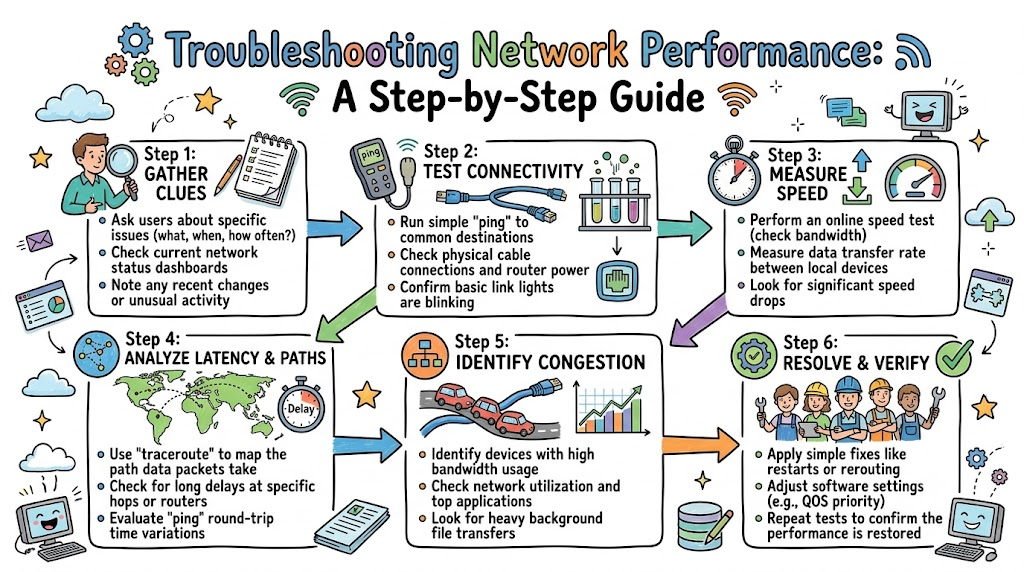
Imagine your favorite computer game stops moving. You wait and wait, but your screen stays frozen.
That annoying slowdown happens when your digital highway has a traffic jam. In simple terms, data gets stuck on its way to your device. You can learn to fix slow connections step by step at Noopsschool.
Troubleshooting means finding out why your internet feels slow. Then, you use easy steps to fix the problem. Let us learn how to fix sluggish networks like a pro!
What Causes Network Slowdowns?
A network connects computers together using invisible signals or long wires. It sends tiny data packets back and forth every second.
Sometimes, a wire comes loose from a router. Other times, too many people stream high-definition movies at once.
When traffic gets too heavy, data packets wait in long lines. This waiting makes your websites load slowly.
How to Check the Physical Wires
Always start your check by looking at real physical parts. Many people forget this easy first step.
Walk over to your internet box and check the cables. Make sure every plug clicks into place tightly.
Next, look at the blinking lights on your router. Green lights mean good news, but blinking red lights warn of problems.
Step-by-Step Network Check
Now you can test your network using simple computer commands. These built-in tools show you where signals stop moving.
First, check if your computer has a proper network address. You can open your terminal and type ipconfig.
Next, send a quick test signal using the ping command. Ping sends a tiny message to see if another computer answers.
If the other machine answers quickly, your path works fine. But if the message times out, data is getting lost.
Key Operational Concepts You Must Know
To solve network slowdowns, you need to know three major ideas. These ideas explain how data moves through wires.
The first idea is bandwidth. Bandwidth is like the width of a water pipe. A wider pipe carries more water at once.
The second idea is latency. Latency is the time a packet takes to reach its goal. Low latency means fast responses on your screen.
The third idea is packet loss. Packet loss happens when data boxes drop out of the network. Dropped boxes force your computer to ask for new copies.
| Term | What It Means | Why It Matters |
|---|---|---|
| Bandwidth | Total pipe width | Lets many people surf at once |
| Latency | Travel wait time | Makes video games feel snappy |
| Packet Loss | Dropped data pieces | Freezes screens and drops calls |
The Power of DNS
Computers do not use human words like we do. Instead, they use numbers called IP addresses.
A system called DNS acts like a giant phone book. It turns website names into number codes.
If DNS breaks, your computer cannot find the right web page. You can test DNS with a command called nslookup.
Platform Implementation vs. Culture — What’s the Real Difference?
Fixing networks takes both fast software platforms and smart team habits.
The platform includes hardware devices, cables, and dashboard screens. It also includes automated code that spots broken links. These tools do the hard work of gathering data.
The culture means how people work together every day. A great team talks openly about computer glitches. They write down fixes so other workers can learn.
Team Roles in Network Care
- Support Techs
- Platform: Use ping and route tools to find stopped packets.
- Culture: Listen patiently to users who report slow loading times.
- Network Builders
- Platform: Install extra routers to balance heavy web traffic.
- Culture: Design simple paths that anyone can check quickly.
- Team Leads
- Platform: Set up warning alarms for dropped data.
- Culture: Teach regular checkups so minor hiccups never cause total outages.
Real-World Use Cases of Modern Operations
Let us see how people fix slow networks in real jobs.
First, look at big schools during exam week. Hundreds of students open test pages at the exact same minute.
School techs check the main switches for bandwidth spikes. They give priority traffic to testing apps so tests never fail.
Next, think about busy online stores. When stores run holiday sales, millions of shoppers load web pages.
If servers slow down, customers leave without buying anything. Techs trace data paths using route tools to dodge jammed internet hubs.
Also, online doctors need super smooth video feeds. They cannot have jittery screens while talking to sick patients.
Engineers prioritize voice and video data over regular file downloads. This smart rule keeps video calls crisp and clear.
Common Mistakes in Operations Engineering
Many people make easy mistakes when they try to fix bad networks.
The most common mistake is restarting every box without looking. Turning off a router erases helpful error logs.
Always check your error clues first before you power cycle hardware. That way, you learn what caused the break in the first place.
Another mistake is guessing the problem instead of testing it. People often blame their internet company right away.
Yet, a bent cable in the hallway is often the real reason. Always test the local connection before you call for outside help.
Lastly, workers forget to write down the changes they make. If you do not record your fixes, you will repeat past mistakes.
How to Become an Operations Expert — Career Roadmap
You can grow up to become a network operations master. It is an exciting path full of fun puzzles to solve.
Start by testing your home computer network. Learn how your home Wi-Fi box shares signals with your television.
Next, learn how to read network command outputs like ping. You can time how long packets take to reach search engines.
| Step | What to Learn | What to Try at Home |
|---|---|---|
| Level 1 | Cable and router basics | Check cable plugs and device lights |
| Level 2 | Diagnostic tools | Run ping and trace commands in terminal |
| Level 3 | Big cloud paths | Build test networks that auto-fix routes |
Finally, study how modern enterprise networks run. Learn how big businesses keep data safe from cyber threats. You will soon become a trusted tech hero!
FAQ Section
- What is the first thing I should check when my network is slow?Check your physical cables and device lights first.A loose wire causes many connection problems.
- What does the ping tool do?Ping sends a small test message to another computer.It counts how many milliseconds the round trip takes.
- Can my Wi-Fi cause network lag?Yes, thick walls and metal objects block Wi-Fi waves.Plugging in a physical cable provides a faster, cleaner path.
- What is DNS failure?A DNS failure means your computer cannot find the website number.The page will not load even if your cables work fine.
- Why does streaming slow down my online games?Streaming uses up most of your available bandwidth.Because of this, game packets must wait in line.
Final Summary
Troubleshooting network performance is all about testing clues in order. Start by checking physical cables, power plugs, and router lights. Next, use built-in tools like ping to check where data packets stop moving.
Remember to keep your team calm and write down every fix you try. Do not guess or restart machines without looking at the logs. When you follow these clear steps, you will solve network lag in no time!