Imagine sending a letter through the postal mail. The outside envelope shows the sender address and delivery address. Most postal workers only look at this outside sticker.
Deep Packet Inspection (DPI) works differently. It opens the envelope and reads the actual message inside. This deep look helps network helpers find hidden computer troubles quickly.
What Is Deep Packet Inspection?
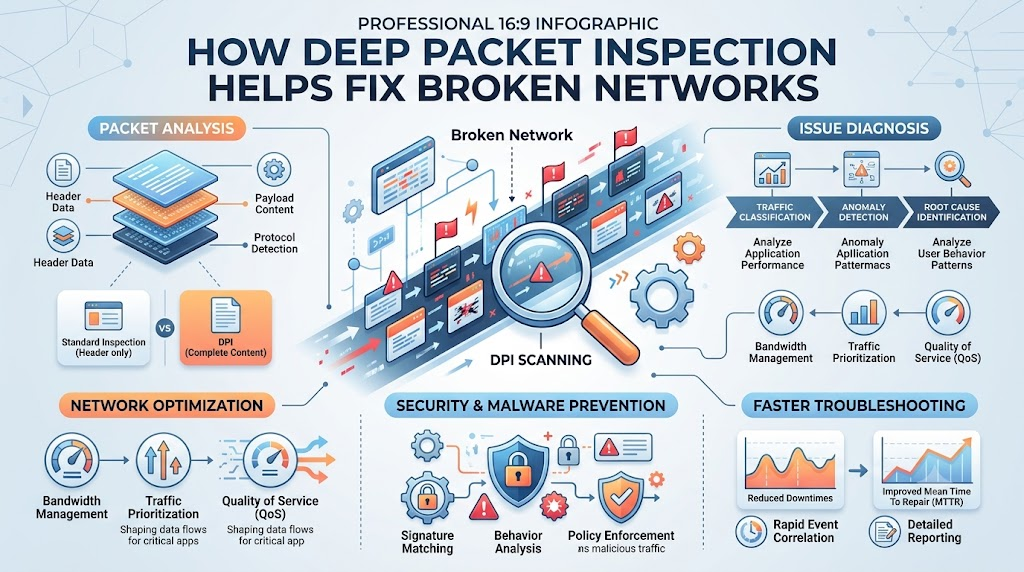
Computers talk by sending small digital boxes called packets. Every packet carries two parts: a header and a payload. The header acts like the address sticker on a box.
The payload contains the real data, like a photo or text. Old network tools only read the address header.
DPI opens the box to inspect the real data inside. So, technicians can see which exact app sent each message.
Finding the Truth Behind Slow Internet
Sometimes your home or office internet crawls like a snail. Simple monitors can show heavy wire traffic. But they cannot explain why the line moves so slowly.
DPI acts like an airport scanner for computer wires. It checks each data box as it flies across the system.
Next, it names every single program using your bandwidth. Helpers can instantly spot file-sharing apps hogging the wire. Then, they can slow down those apps to clear the road.
Catching Hidden Network Bugs
Broken computer software can create weird network glitches. Some apps send broken packets that crash ordinary routers.
Normal tools miss these broken packets because the address looks fine. DPI decodes the inside data structure.
It shows engineers if an app violates normal communication rules. This helps programmers patch the exact code error fast.
Stopping Sneaky Malware and Attacks
Bad software often hides inside normal web traffic. Sneaky hackers use standard web ports to hide dangerous commands.
DPI looks past the port number. It scans the payload data for known virus patterns.
Because of this deep check, security tools block bad traffic right away. This stops viruses from stealing files or slowing the network down.
Giving Priority to Important Tasks
Not all internet data shares the same value. Voice calls and live video lessons need to move right away.
DPI tags live voice calls so routers send them first. Other tasks, like background updates, wait in line for later.
- Live Video: Sent ahead first so your screen never freezes.
- Voice Calls: Kept clear to stop robotic voice sounds.
- File Downloads: Slowed down slightly so the main line stays clear.
Why Engineers Love Deep Packet Tools
DPI gives technicians clear eyes inside their wires. Without it, engineers must guess what causes slow networks.
With it, teams solve mystery crashes in minutes instead of days. It keeps connections fast, safe, and ready for work.